
RichLabel
簡介
RichLabel基於Cocos2dx+Lua v3.x
解析字符串方面使用了labelparser,它可以將一定格式的字符串,轉換為lua中的表結構
擴展標簽極其簡單,只需添加一個遵守規則的標簽插件即可,無需改動已存在代碼!!!
(標簽插件都在labels文件夾下)
labelparser的詳解
labelparser在github上的源碼
RichLabel在github上的源碼
- 支持圖片(縮放,旋轉,是否可見)
- 支持文本屬性(字體,大小,顏色,陰影,描邊,發光)
- 支持標簽嵌套修飾文本,但是內部標簽不會繼承嵌套標簽的屬性
- 支持標簽擴展(labels文件夾中可添加標簽支持)
- 支持漸入動畫,動畫逐字回調
- 支持設置最大寬度,自動換行布局
- 支持手動換行,使用'\n'換行
- 支持設置行間距,字符間距
- 支持添加debug繪制文字范圍和錨點
- 支持獲得文字的精靈節點
- 支持設置標簽錨點,透明度,顏色...
- 支持遍歷字符,行等
- 支持獲得任意行的行高
效果:
------------------------------------------------------
------------  TEST RICH-LABEL
------------------------------------------------------

local test_text = {
    "<div fontcolor=#ff0000>hello</div><div fontcolor=#00ff00>hello</div><div fontsize=12>你</div><div fontSize=26 fontcolor=#ff00bb>好</div>ok",
    "<div outline=1,#ff0000 >hello</div>",
    "<div glow=#ff0000 >hello</div>",
    "<div shadow=2,-2,0.5,#ff0000 >hello</div>",
    "hello<img src='res/test.png' scale=0.5 rotate=90 visible=true />world",
}
for i=1, #test_text do
    local RichLabel = require("richlabel.RichLabel")
    local label = RichLabel.new {
        fontName = "res/msyh.ttf",
        fontSize = 20,
        fontColor = cc.c3b(255, 255, 255),
        maxWidth=200,
        lineSpace=0,
        charSpace=0,
    }
    label:setString(test_text[i])
    label:setPosition(cc.p(380,500-i*30))
    label:playAnimation()
    sceneGame:addChild(label)

    label:debugDraw()
end
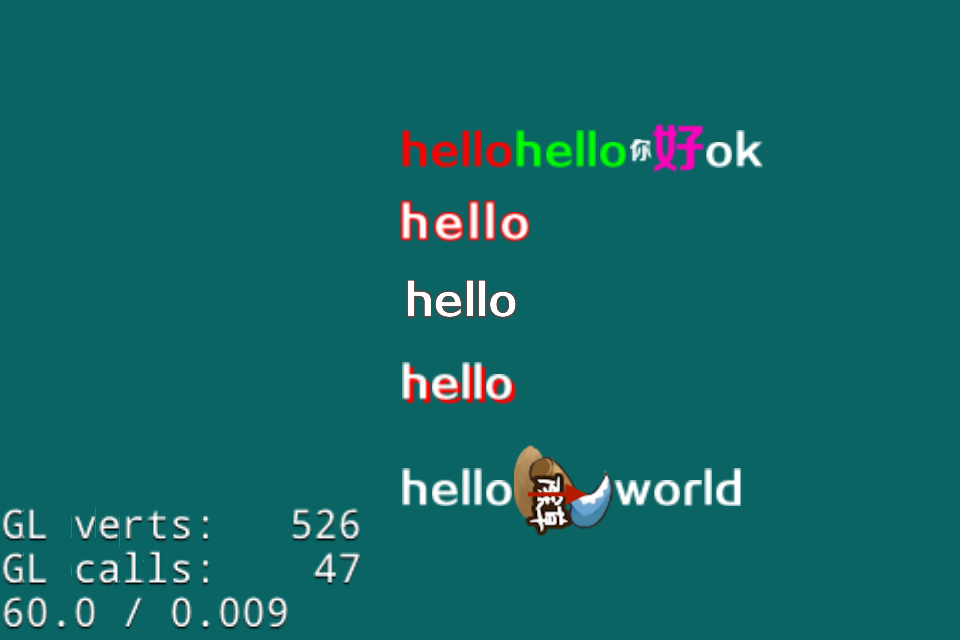
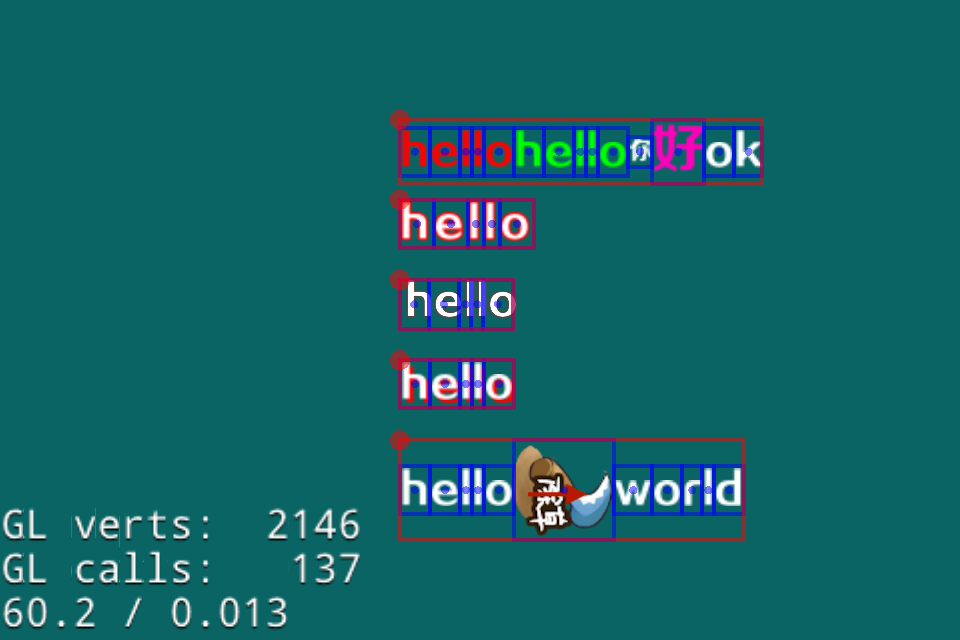
由於解析字符串使用了labelparser,那么我們先簡單了解一下它,詳細了解 傳送門
下面就是使用labelparser解析富文本串用法和產生的table格式,大概了解一下
local text1 = "hello worldd   <div>hello world</div> 你好 <div fontName='nihao' fontColore=#ff33ee>hello,world</div><div></div>"
local parsedtable = labelparser.parse(text1)
-- output:
<parsedtable> = {
    {
        content = "hello worldd   ",
        labelname = "div",
    },
    {
        content = "hello world",
        labelname = "div",
    },
    {
        content = " 你好 ",
        labelname = "div",
    },
    {
        content = "hello,world",
        fontname = "nihao",
        fontsize = "#123456",
        labelname = "div",
    },
}
這種格式十分方便我們處理,它將每個文本片段及其屬性分拆成table,然后按順序組織好返回給我們
這樣我們處理就可以簡單多了
原理
首先要說一下,這位前輩靈動君心他也有一個RichLabel,但是無法滿足我的需求,大體思路和他類似。
大體思路:
1.解析字符串
2.解析出來的表中元素的處理
- 對於字符串的處理就是將字符串拆分成一個個字符,然后每個字符創建一個Label
- 對於圖片的處理就是直接創建精靈
3.將創建好的node布局即可
第一步
解析字符串,解析字符串使用了我的另一個開源工具labelparser,直接解析就可以返回table
第二步
我們按照順序從表第一項開始處理
每一項都可以獲得對應的標簽名,根據標簽名調用對應的標簽的處理函數,同時要將表項中的屬性傳入標簽處理函數
(這個處理函數是以插件形式提供的,很便於擴展)
下面是img標簽解析的的代碼(label_img.lua)
--
-- <img/> 標簽解析
--

return function (self, params, default)
    if not params.src then return
    end
    -- 創建精靈,自動在幀緩存中查找,屏蔽了圖集中加載和直接加載的區別
    local sprite = self:getSprite(params.src)
    if not sprite then
        self:printf("<img> - create sprite failde")
        return
    end
    if params.scale then
        sprite:setScale(params.scale)
    end
    if params.rotate then
        sprite:setRotation(params.rotate)
    end
    if params.visible ~= nil then
        sprite:setVisible(params.visible)
    end
    return {sprite}
end
第三步
此時我們就獲得了設置好屬性的node,我們要做的就是布局文本
首先我們處理換行,什么時候換行呢?
+ 如果設置了MaxWidth那么,每行最大寬度不能超過MaxWidth,否則就換行
+ 如果文本內容中存在換行符\n,則直接換行
我們遍歷所有的node(node存在順序)然后檢測是否為Label,為Label則檢測內容是否為\n,然后檢測此時累加寬度若超過了最大寬度,則將當前的node直接放到下一行
代碼
-- 自動適應換行處理方法,內部會根據最大寬度設置和'\n'自動換行
-- 若無最大寬度設置則不會自動換行
function RichLabel:adjustLineBreak_(allnodelist, charspace)
    -- 如果maxwidth等於0則不自動換行
    local maxwidth = self._maxWidth
    if maxwidth <= 0 then maxwidth = 999999999999
    end
    -- 存放每一行的nodes
    local alllines = {{}, {}, {}}
    -- 當前行的累加的寬度
    local addwidth = 0
    local rowindex = 1
    local colindex = 0
    for _, node in pairs(allnodelist) do
        colindex = colindex + 1
        -- 為了防止存在縮放后的node
        local box = node:getBoundingBox()
        addwidth = addwidth + box.width
        local totalwidth = addwidth + (colindex - 1) * charspace
        local breakline = false
        -- 若累加寬度大於最大寬度
        -- 則當前元素為下一行第一個元素
        if totalwidth > maxwidth then
            rowindex = rowindex + 1
            addwidth = box.width -- 累加數值置當前node寬度(為下一行第一個)
            colindex = 1
            breakline = true
        end

        -- 在當前行插入node
        local curline = alllines[rowindex] or {}
        alllines[rowindex] = curline
        table.insert(curline, node)

        -- 若還沒有換行,並且換行符存在,則下一個node直接轉為下一行
        if not breakline and self:adjustContentLinebreak_(node) then
            rowindex = rowindex + 1
            colindex = 0
            addwidth = 0 -- 累加數值置0
        end
    end
    return alllines
end

-- 判斷是否為文本換行符
function RichLabel:adjustContentLinebreak_(node)
    -- 若為Label則有此方法
    if node.getString then
        local str = node:getString()
        -- 查看是否為換行符
        if str == "\n" then
            return true
        end
    end
    return false
end
這樣我們就將混在一塊的node拆分成一個table中存一行
雖然我們知道哪些node在第一行,哪些在第二行... ...
但是我們還沒有布局呢!!!
下面我們就遍歷每一行,然后調用行布局函數layoutLine_, 行累加函數還返回行的真實寬度和高度,這樣我們就可以計算出最寬的一行,即為RichLabel的寬度
精簡后代碼
for index, line in pairs(alllines) do
    local linewidth, lineheight = self:layoutLine_(basepos, line, 1, charspace)
    -- todo
end
行布局函數(精簡后)
-- 布局單行中的節點的位置,並返回行寬和行高
function RichLabel:layoutLine_(basepos, line, anchorpy, charspace)
    local pos_x = basepos.x
    local pos_y = basepos.y
    local lineheight = 0
    local linewidth = 0
    for index, node in pairs(line) do
        local box = node:getBoundingBox()
        -- 設置位置
        node:setPosition((pos_x + linewidth + box.width/2), pos_y)
        -- 累加行寬度
        linewidth = linewidth + box.width + charspace
        -- 查找最高的元素,為行高
        if lineheight < box.height then lineheight = box.height
        end
    end
    return linewidth, lineheight
end
這樣我們就一行行布局好了
工具函數
問題:文本標簽處理函數,首先要先將字符串拆分成一個個字符,如果字符串中存在中文那么直接拆分肯定是不行的
拆分字符串,支持Unicode編碼
function RichLabel:stringToChars(str)
    -- 主要用了Unicode(UTF-8)編碼的原理分隔字符串
    -- 簡單來說就是每個字符的第一位定義了該字符占據了多少字節
    -- UTF-8的編碼:它是一種變長的編碼方式
    -- 對於單字節的符號,字節的第一位設為0,后面7位為這個符號的unicode碼。因此對於英語字母,UTF-8編碼和ASCII碼是相同的。
    -- 對於n字節的符號(n>1),第一個字節的前n位都設為1,第n+1位設為0,后面字節的前兩位一律設為10。
    -- 剩下的沒有提及的二進制位,全部為這個符號的unicode碼。
    local list = {}
    local len = string.len(str)
    local i = 1
    while i <= len do
        local c = string.byte(str, i)
        local shift = 1
        if c > 0 and c <= 127 then
            shift = 1
        elseif (c >= 192 and c <= 223) then
            shift = 2
        elseif (c >= 224 and c <= 239) then
            shift = 3
        elseif (c >= 240 and c <= 247) then
            shift = 4
        end
        local char = string.sub(str, i, i+shift-1)
        i = i + shift
        table.insert(list, char)
    end
    return list, len
end
問題:處理顏色也要說一下,由於使用HTML方式標記顏色,所以要解析#FF0099這種類型的顏色
這里需要注意返回的是cc.c4b ,因為我們可能使用顏色設置Label陰影,而Label的陰影函數要求cc.c4b,但是如果傳入cc.c3b的話,alpha值會為0,結果就是沒效果!!!
對於這種情況的詳細討論見 Cocos2dx+lua中Color參數的坑
-- 解析16進制顏色rgb值
function  RichLabel:convertColor(xstr)
    if not xstr then return
    end
    local toTen = function (v)
        return tonumber("0x" .. v)
    end

    local b = string.sub(xstr, -2, -1)
    local g = string.sub(xstr, -4, -3)
    local r = string.sub(xstr, -6, -5)

    local red = toTen(r)
    local green = toTen(g)
    local blue = toTen(b)
    if red and green and blue then
        return cc.c4b(red, green, blue, 255)
    end
end
問題:因為也支持了圖片,所以圖片的加載必須要考慮,無論是從圖集中加載還是碎圖加載都應該正常
-- 創建精靈,現在幀緩存中找,沒有則直接加載
-- 屏蔽了使用圖集和直接使用碎圖創建精靈的不同
function RichLabel:getSprite(filename)
    local spriteFrameCache = cc.SpriteFrameCache:getInstance()
    local spriteFrame = spriteFrameCache:getSpriteFrameByName(filename)

    if spriteFrame then
        return cc.Sprite:createWithSpriteFrame(spriteFrame)
    end
    return cc.Sprite:create(filename)
end
要詳細了解還是去看看代碼吧!!!