
standalone 模式的高可用

部署
flink 使用zookeeper協調多個運行的jobmanager,所以要啟用flink HA 你需要把高可用模式設置成zookeeper,配置zookeeper相關參數,並且在masters配置文件中配置所有的jobmanager主機地址和web UI 端口
在一下例子中,我們配置node1,node2,node3三個jobmanager
-
編輯
conf/mastersnode1:8081 node2:8081 node3:8081 -
編輯
conf/flink-conf.yamlhigh-availability: zookeeper high-availability.zookeeper.quorum: node1:2181,node2:2181,node3:2181 high-availability.zookeeper.path.root: /flink high-availability.cluster-id: /cluster_one high-availability.storageDir: hdfs:///flink/recovery -
啟動集群
bin/start-cluster.sh
yarn 模式的高可用
yarn 模式中不會同時運行多個jobmanager(ApplicationMaster) instances,而是只運行一個,如果ApplicationMaster異常會依靠Yarn機制進行重啟.
部署
-
編輯
yarn-site.xml添加如下配置<property> <name>yarn.resourcemanager.am.max-attempts</name> <value>4</value> <description> The maximum number of application master execution attempts. </description> </property>設置application master 最大重啟次數
-
編輯
conf/flink-conf.yamlhigh-availability: zookeeper high-availability.zookeeper.quorum: node1:2181,node2:2181,node3:2181 high-availability.storageDir: hdfs:///flink/recovery high-availability.zookeeper.path.root: /flink yarn.application-attempts: 10配置HA模式為
zookeeper,並設置應用的最大重啟次數 -
啟動一個yarn session
bin/yarn-session.sh -n 2
原理
采用curator庫中的LeaderLatch實現leader選舉。不了解的同學可以移步curator相關文檔LeaderLatch
在zookeeper中生成的主要目錄結構如下圖:

涉及到的主要類:
-
選舉:
首先我們看一下
JobManager的構造函數:

注意它的構造函數需要
LeaderElectionService對象作為參數以及它本身實現了LeaderContender接口。那么LeaderElectionService是怎么創建的?其實就是根據high-availability: zookeeper此配置項,由HighAvailabilityServicesUtils工具類的createAvailableOrEmbeddedServices方法創建HighAvailabilityServices對象然后通過其getJobManagerLeaderElectionService方法創建:public static HighAvailabilityServices createAvailableOrEmbeddedServices( Configuration config, Executor executor) throws Exception { HighAvailabilityMode highAvailabilityMode = LeaderRetrievalUtils.getRecoveryMode(config); switch (highAvailabilityMode) { case NONE: return new EmbeddedHaServices(executor); case ZOOKEEPER: BlobStoreService blobStoreService = BlobUtils.createBlobStoreFromConfig(config); return new ZooKeeperHaServices( ZooKeeperUtils.startCuratorFramework(config), executor, config, blobStoreService); default: throw new Exception("High availability mode " + highAvailabilityMode + " is not supported."); } }
    ```java
	public static ZooKeeperLeaderElectionService createLeaderElectionService(
		final CuratorFramework client,
		final Configuration configuration,
		final String pathSuffix)
	{
		final String latchPath = configuration.getString(
			HighAvailabilityOptions.HA_ZOOKEEPER_LATCH_PATH) + pathSuffix;
		final String leaderPath = configuration.getString(
			HighAvailabilityOptions.HA_ZOOKEEPER_LEADER_PATH) + pathSuffix;

		return new ZooKeeperLeaderElectionService(client, latchPath, leaderPath);
	}
我們再了解一下`ZooKeeperLeaderElectionService`
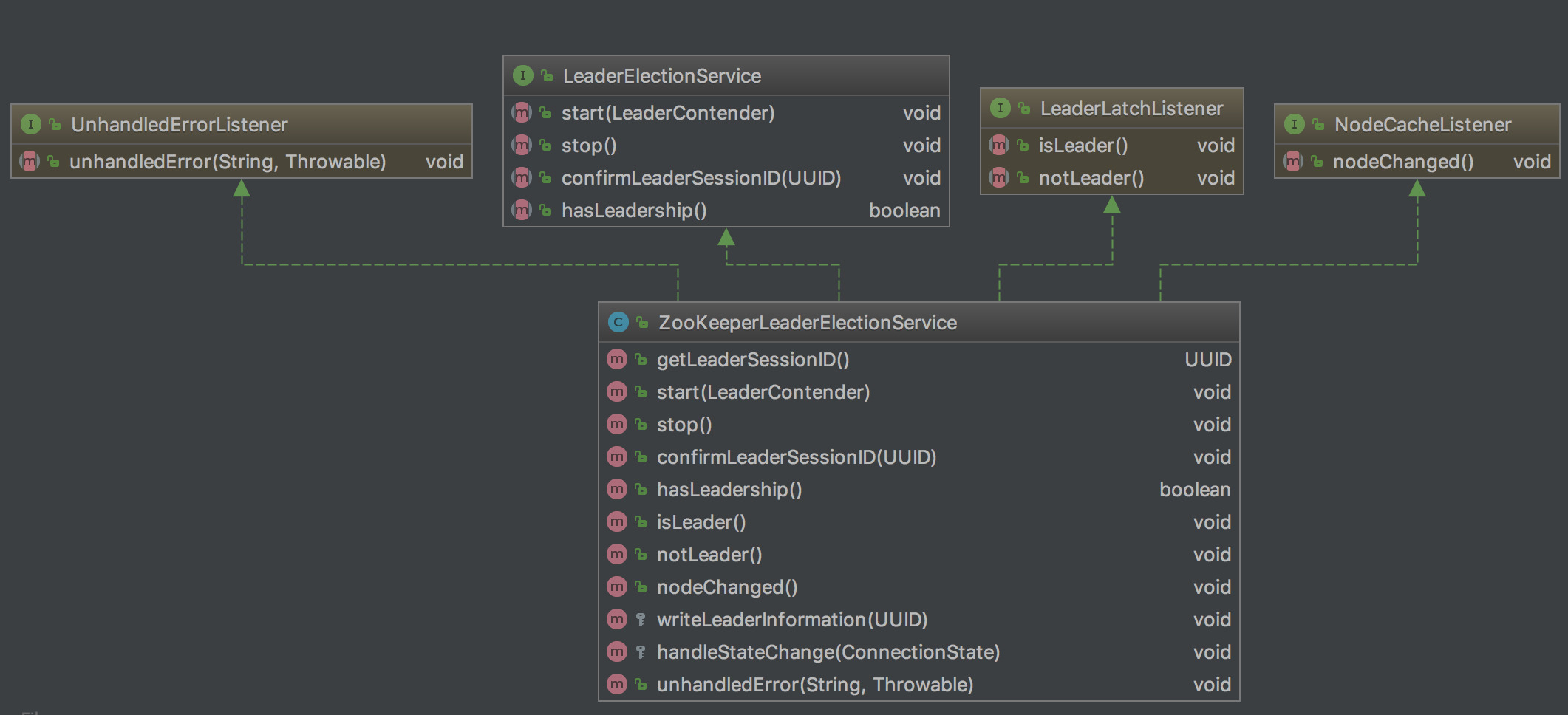
以及`LeaderContender`
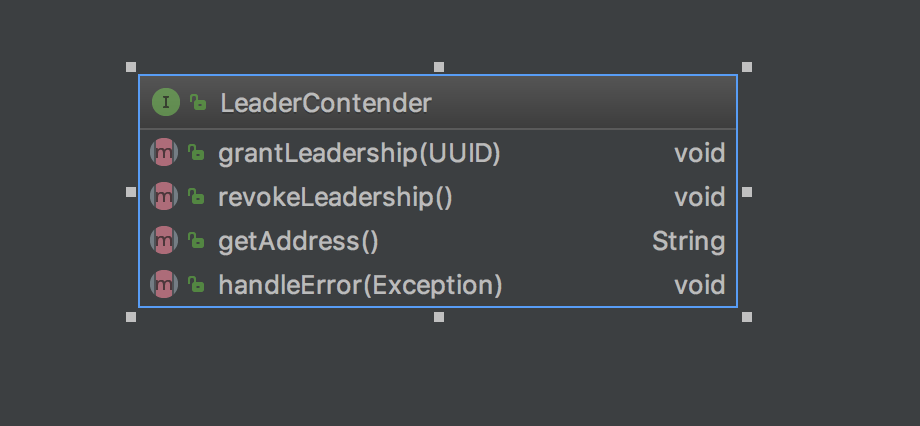
`ZooKeeperLeaderElectionService`類主要管理`namespace`下的兩個路徑,即`latchPath`(/leaderlatch)和`leaderPath(/leader)`,`latchPath`用來進行leader選舉,`leaderPath`存儲選舉出的leader的地址和UUID。
`LeaderContender`類用於當leader發生改變時,收到相應的通知以進行相關業務處理。比如:自己變成leader時,進行job恢復;當自己被撤銷leader時,斷開注冊的TaskManager。
在`JobManager`的`preStart`方法中會調用`ZooKeeperLeaderElectionService`的`start`方法注冊`LeaderLatch`(/leaderlatch)和`NodeCache`(/leader)的監聽器。如果某個`LeaderLatch`被選為leader,則對應的`ZooKeeperLeaderElectionService`對象的`isLeader`方法會被回調,從而調用`LeaderContender->grantLeadership()`通知被選中的競選者(此處為JobManager),然后`JobManager`會調用`LeaderElectionService->confirmLeaderSessionID()`把被選中的leader的相關信息寫入到`/leader`目錄下,並異步進行job恢復工作。
NodeCache(/leader)的監聽器監聽寫入數據的變化,並具備糾錯功能。
```java
public void isLeader() {
	synchronized (lock) {
		if (running) {
			issuedLeaderSessionID = UUID.randomUUID();
			confirmedLeaderSessionID = null;

			if (LOG.isDebugEnabled()) {
				LOG.debug(
					"Grant leadership to contender {} with session ID {}.",
					leaderContender.getAddress(),
					issuedLeaderSessionID);
			}

			leaderContender.grantLeadership(issuedLeaderSessionID);
		} else {
			LOG.debug("Ignoring the grant leadership notification since the service has " +
				"already been stopped.");
		}
	}
}
leader重新選舉后需要恢復提交的Job以及恢復相應job的checkpoint。 這就涉及到`JobManager`構造函數圖示中圈紅的`SubmittedJobGraphStore`和`CheckpointRecoveryFactory`這兩個類,我們后邊專門進行詳細講解。
* 查詢:
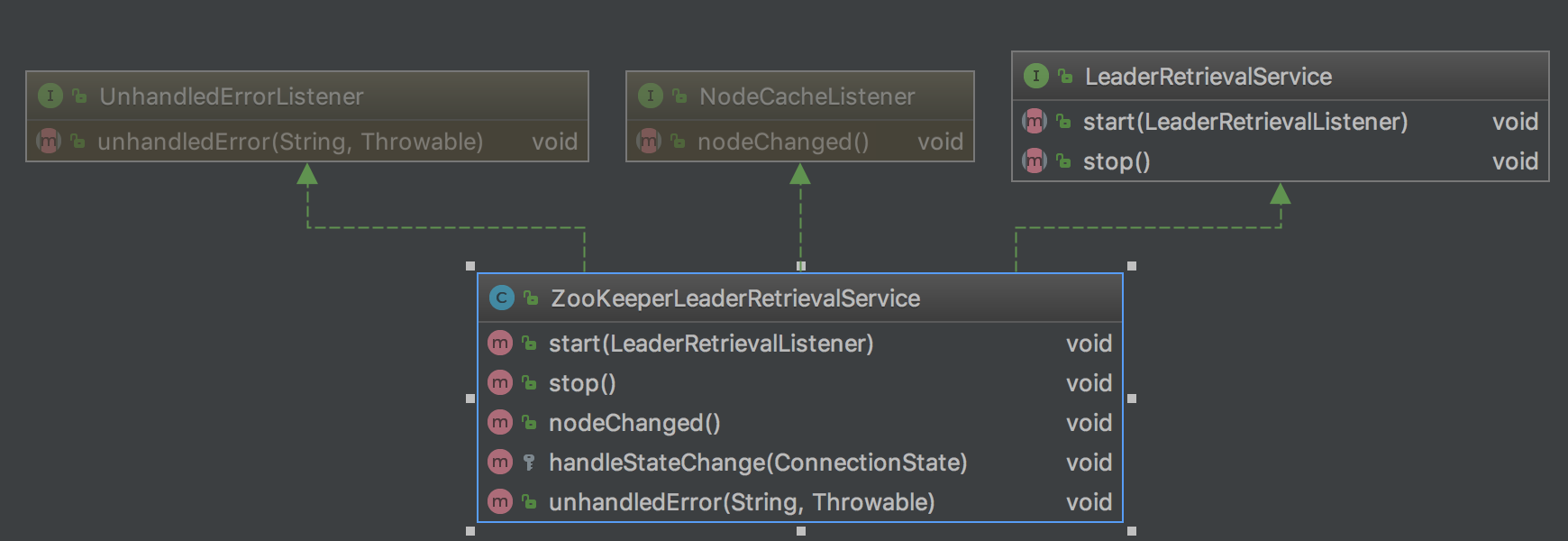
`ZooKeeperLeaderRetrievalService`通過監聽`/flink/{cluster_id}/leader/{default_jobid}/job_manager_lock`目錄的變化,讀取該目錄下的數據然后通過`LeaderRetrievalListener`的`notifyLeaderAddress`方法通知實現該接口的對象。比如更新`FlinkMiniCluster`的`leaderGateway`