
Tensorboard 可視化之訓練過程
上一篇涉及 Tensorboard 可視化的神經網絡圖層, 只是讓我們看清楚神經網絡的結構. 今天, 我們要借助 Tensorboard 來可視化訓練過程, 看看訓練的過程到底是多么坎坷艱難的.
基本步驟
* 制作輸入源 * 在 `layer` 中為 Weights, biases 設置變化圖 * 設置 `loss` 的變化圖 * 合並所有訓練圖 * 在 tensorboard 中查看 *
制作輸入源
生成模擬數據, 加入噪聲 noize 仿真
x_data = np.linspace(-1, 1, 300, dtype=np.float32)[:, np.newaxis]
noise    = np.random.normal(0, 0.05, x_data.shape).astype(np.float32)
y_data = np.square(x_data) - 0.5 + noise
在 layer 中為 Weights, biases 設置變化圖
首先, 我們要為每個圖表命名, 所以簡單的修改 add_layer 函數 (add_layer 函數只是方便添加層, 不是固定的), 添加個圖層名
def add_layer(inputs, in_size, out_size, n_layer, activation_function=None):
	# Add layer name
	layer_name = 'layer%s' % n_layer
接着就是先給 Weights 設置變化圖, 使用函數 tf.summary.histogram(name, variable) 來設置
def add_layer(inputs, in_size, out_size, n_layer, activation_function=None):
	# Add layer name
	layer_name = 'layer%s' % n_layer

	with tf.name_scope('weights'):
		Weights = tf.Variable(tf.random_normal([in_size, out_size]), name='W')
		# name: 圖表名, variable: 要監測的變量
		tf.summary.histogram(layer_name+'/weights', Weights)
	# 后面的類似...
用同樣的方法繪制 biases, output 等, 每個 histogram 都會獨立繪制一副直方圖.
添加隱藏層和輸出層, 只是加了 layer 層數
# Add hidden layer
with tf.name_scope('hidden_layer'):
	l1 = add_layer(xs, 1, 10, n_layer=1, activation_function=tf.nn.relu)
# Add output layer
with tf.name_scope('output_layer'):
	prediction = add_layer(l1, 10, 1, n_layer=2, activation_function=None)
設置 loss 變化圖
為什么 `loss` 變化圖要另外設置呢? 因為 loss 是在 tensorboard 的 `event` 選項卡下的, 要使用 `tf.scalar_summary()` 方法創建 (最新版在 scalars 下, 沒有 event 這項了) ``` with tf.name_scope('loss'): loss = tf.reduce_mean(tf.reduce_sum(tf.square(ys-prediction), reduction_indices=[1])) tf.summary.scalar('loss', loss) ```
合並所有訓練圖
合並所有 summary 需要用 tf.summary.merge_all()
merged = tf.summary.merge_all()
開始訓練
如果只是 run train_step, 並不會記錄訓練的數據. 所以我們需要在訓練過程中記錄結果, 當然 merged 也需要 run 才真正執行 ``` for i in range(1000): sess.run(train_step, feed_dict={xs: x_data, ys: y_data}) if i % 50 == 0: rs = sess.run(merged, feed_dict={xs: x_data, ys: y_data}) # 記錄訓練數據 writer.add_summary(rs, i) ```
運行程序, 瀏覽器查看
``` [Ubuntu16 ~]# python3 filename.py [Ubuntu16 ~]# tensorboard --logdir='graph' Starting TensorBoard b'41' on port 6006 (You can navigate to http://127.0.1.1:6006) ... ```
loss 圖表在 SCALARS 選項卡下

DISTRIBUTIONS & HISTOGRAMS 選項卡下都有 hidden_layer & output_layer, 但形式不一樣
DISTRIBUTIONS 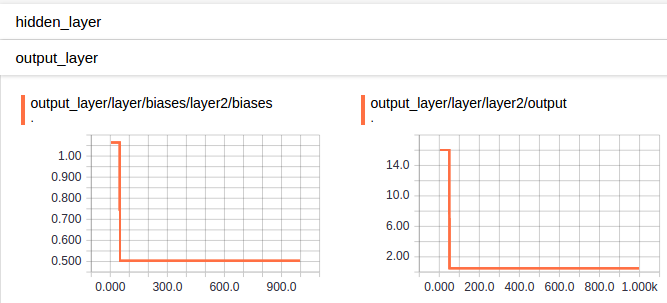
HISTOGRAMS

完整代碼
# !/usr/bin/env python3
# -*- coding: utf-8 -*-

import tensorflow as tf
import numpy as np
import matplotlib.pyplot as plt


# Define add layer function.
def add_layer(inputs, in_size, out_size, n_layer, activation_function=None):
    layer_name = 'layer%s' % n_layer
    # add one more layer and return the output of this layer
    with tf.name_scope('layer'):
        with tf.name_scope('weights'):
            Weights = tf.Variable(tf.random_normal([in_size, out_size]), name='W')
            # Draw histogram: name, variable
            tf.summary.histogram(layer_name + '/weights', Weights)

        with tf.name_scope('biases'):
            biases = tf.Variable(tf.zeros([1, out_size]) + 0.1)
            tf.summary.histogram(layer_name + '/biases', biases)

        with tf.name_scope('wx_plus_b'):
            Wx_plus_b = tf.add(tf.matmul(inputs, Weights), biases)

        if activation_function is None:
            outputs = Wx_plus_b
        else:
            outputs = activation_function(Wx_plus_b, )

        # at histogram
        tf.summary.histogram(layer_name + '/output', outputs)
        return outputs

# Define palceholder for inputs to network.
# Use [with] including xs & ys:
with tf.name_scope('inputs'):
    xs = tf.placeholder(tf.float32, [None, 1], name='x_in') # Add name
    ys = tf.placeholder(tf.float32, [None, 1], name='y_in')

# Make up some real data
x_data = np.linspace(-1, -1, 300, dtype=np.float32)[:, np.newaxis]
noise = np.random.normal(0, 0.05, x_data.shape).astype(np.float32)
y_data = np.square(x_data) - 0.5 + noise


# Add hidden layer
with tf.name_scope('hidden_layer'):
    l1 = add_layer(xs, 1, 10, n_layer=1, activation_function=tf.nn.relu)
# Add output layer
with tf.name_scope('output_layer'):
    prediction = add_layer(l1, 10, 1, n_layer=2, activation_function=None)

# The error between prediction and real data
with tf.name_scope('loss'):
    loss = tf.reduce_mean(tf.reduce_sum(tf.square(ys-prediction),
        reduction_indices=[1]))
    # Scalar -- at event
    tf.summary.scalar('loss', loss)

with tf.name_scope('train'):
    train_setp = tf.train.GradientDescentOptimizer(0.1).minimize(loss)

sess = tf.Session()

merged = tf.summary.merge_all()

# ** Add frame to file
writer = tf.summary.FileWriter('./graph/', sess.graph)

# Important step
sess.run(tf.global_variables_initializer())

# Start training:
for i in range(1000):
    sess.run(train_setp, feed_dict={xs: x_data, ys: y_data})
    if i % 50 == 0:
        result = sess.run(merged, feed_dict={xs: x_data, ys: y_data})
    writer.add_summary(result, i)