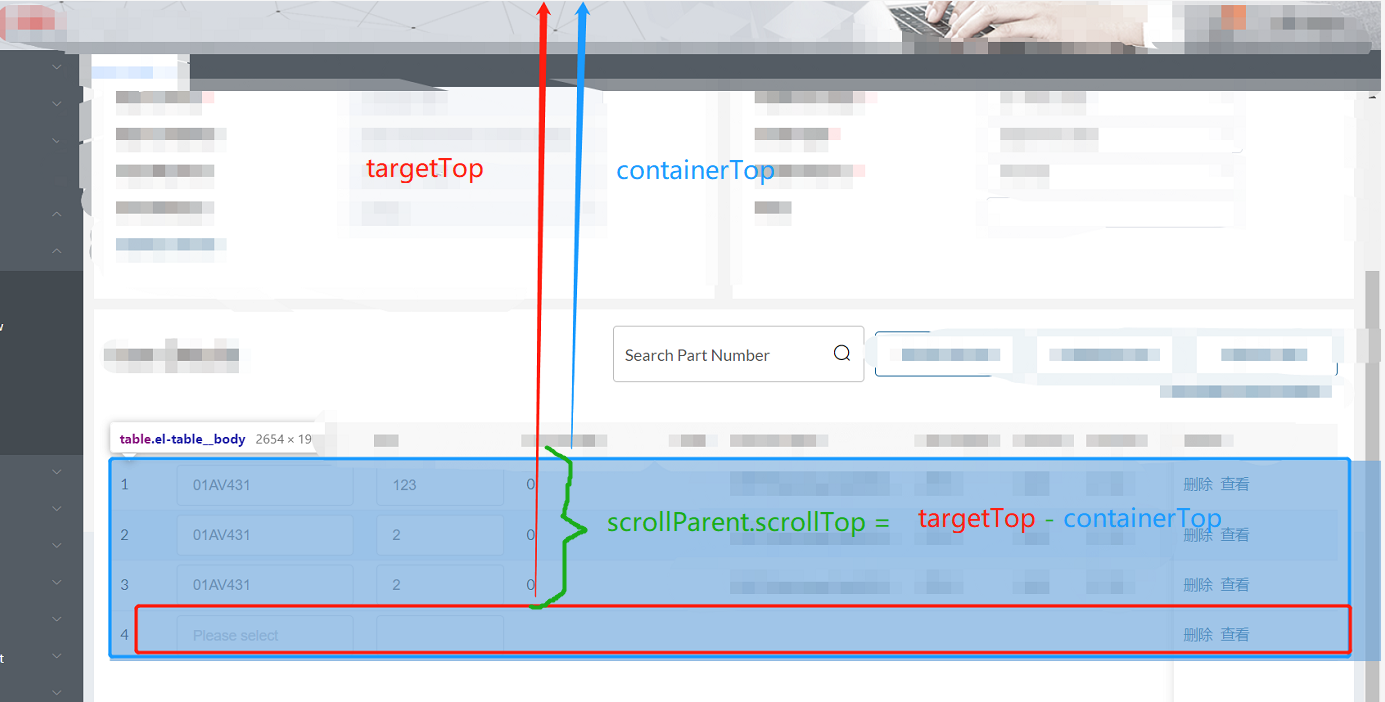
需求:前端根據搜索條件中的partNo的值,進行定位查詢到table列表中對應的每一行
search(){
if(this.positionIndx.length==0){
this.tableData.forEach((item,index)=>{
if(item.partNo == this.queryForm.partNo){
this.positionIndx.push(index) // 定義一個空數組 positionIndx 用來保存相同partNo的下標;
}
})
}
if (this.tableData.length > 0) {
if (this.queryForm.partNo !== '') {
if (this.$refs['selectPartRefs']) {
let vmEl = this.$refs['selectPartRefs'].$el // selectPartRefs 是table中綁定的ref的值,一定要保持一致;
//計算滾動條的位置
const targetTop = vmEl.querySelectorAll('.el-table__body tr')[this.positionIndx[this.inPosition]].getBoundingClientRect().top // 找到table中的每一行利用下標來計算每一行dom元素的上部與瀏覽器的可視窗口的上面的高度距離;
const containerTop = vmEl.querySelector('.el-table__body').getBoundingClientRect().top
const scrollParent = vmEl.querySelector('.el-table__body-wrapper')
scrollParent.scrollTop = targetTop - containerTop;
this.inPosition++; // 首先在data中定義 inPosition = 0 ,每次點擊search按鈕的時候,讓下標進行++操作,以遍定位到下一個匹配的partNO;
if( this.inPosition >= this.positionIndx.length ){
this.inPosition = 0; // 所有的都遍歷完成以后,讓定位回到第一個匹配的partNo的行上,以此達到可以循環定位的效果;
}
}
} else {
this.$message({
type: 'error',
message:'Please enter the partNo of the query'
})
}
}
},