
前言
自從 vite 發布之后,社區贊譽無數,而我也一直心水 vite 的輕量快速的熱重載的特性,特別是公司的項目巨大,已經嚴重拖慢了熱重載的速度了,每次熱重載都要等上一小會,所以急需尋找一個解決方案。也發現自己很久沒更新博客了,順手更新一篇下 😢
雖然,我們通過 webpack 配置,指定了在本地加載的路由,使得熱更新更加迅速一些,但是仍然是遠遠不夠的。所以就想着使用 vite 進行嘗試了。
const fs = require("fs");
const path = require("path");
function resolve(dir) {
  return path.join(__dirname, dir);
}
const isLocal = process.env.LOCAL === "true";
module.exports = {
  chainWebpack: (config) => {
    if (isLocal && fs.existsSync(resolve("/src/mainDev.js"))) {
      config.entry("app").clear().add("./src/mainDev.js");
    }
  },
};
ps: 我的理想的方案是:
webpack仍然作為打包工具,vite作為開發工具。因為我仍然覺得webpack還是當下構建webapp的最佳實踐(帶有代碼拆分,舊瀏覽器的 Legecy-build)。所以,我會盡量在vite和webpack環境下維護一份配置。
ps: 為了更加無縫的遷移 Vite,這里使用了 vue-cli 插件,即 vue-cli-plugin-vite
本次教程可能過於啰嗦,可以先到gitee、github下載體驗,也可到文末直接下載代碼先自行體驗。。。
特別說明:項目使用的 Node 版本為 14.17.6,Node10 項目的版本為 10.15.3,皆為 Node 穩定版本
初步體驗
有了這個想法,當然就打開官網直接開干呀,打開搭建第一個 Vite 項目,發現 Vite 需要 Node.js 版本 >= 12.0.0,而我公司用的是 Node10 穩定版。
哦豁 😢!!看到這里,本以為本次遷移就到此結束了~~。
Node10 嘗試(可選)
當然,我抱着嘗着一試的心態,在 Node10 中運行 Vite,然后出現報錯了,具體如下:
Error: Cannot find module 'worker_threads'
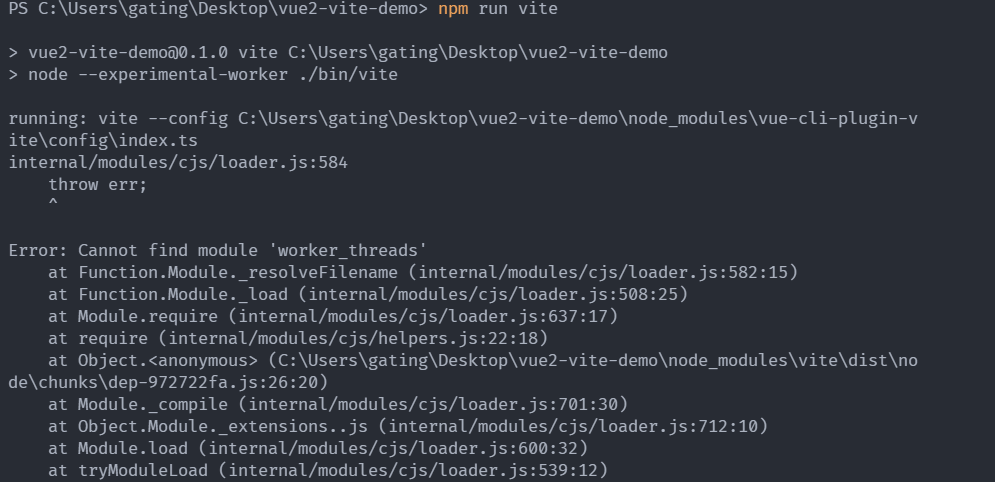
所以我 google 搜索了下 答案,發現 Node10.5 就支持了 workers,不過 Node12 是自動開啟,而 Node10 是需要手動開啟,所以這邊做了如下修改(偽代碼):
{
  "scripts": {
    "vite": "node --experimental-worker ./bin/vite"
  }
}
然后- -,Vite 底層出現了新的報錯,因為 Vite 的使用了數組的 flat 方法。
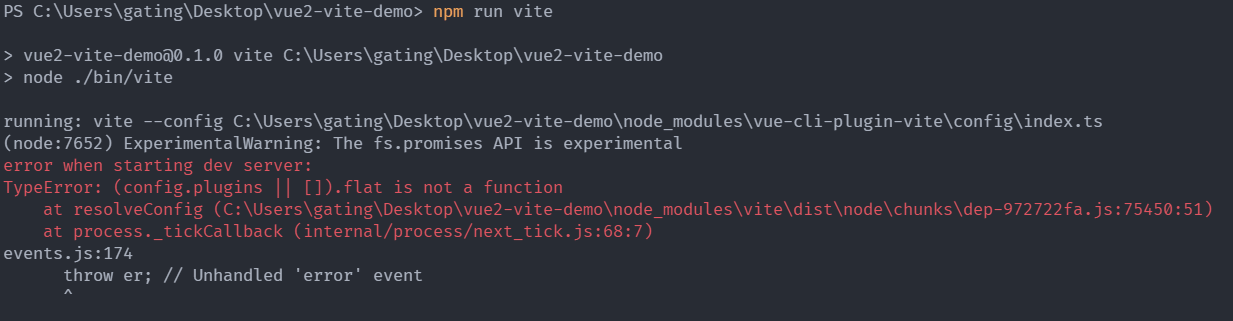
所以我們需要對 Vite 進行 Babel 的編譯,所以我們需要安裝一下 @babel/node,npm i @babel/node -D,偽代碼:
{
  "scripts": {
    "vite": "babel-node --experimental-worker ./bin/vite"
  }
}
然后就可以愉快的運行啦
ps: 因為這里使用的是 vue-cli-plugin-vite,他是使用 cross-spawn 執行腳本的,所以這里的 babel-node --experimental-worker 在 scripts 無效,需要在 ./bin/vite 文件里編寫,具體參考這個鏈接-GITEE、這個鏈接-GITHUB
開始搭建
為了大家盡可能的少改 webpack,我的案例中也覆蓋了相對多的常用配置,比如:
- scss 變量注入
- 環境變量的使用
- 使用別名 alias
- 配置 resolve externals
- 使用 jsx
- require 語法
- devServer
- require.context 語法兼容
ps: 兼容這些雖然多數都是 vue-cli-plugin-vite 做的事,但是就是想着大家可以拿來即用 😂,更多兼容參考vue-cli-plugin-vite
為了更好的編寫體驗,這里提供一個基礎的 vue-cli 的demo,可以 download 下來一起嘗試編寫一下。
安裝 vue-cli-plugin-vite
在當前項目打開終端,運行:
vue add vite
忽略 .vue 拓展名
這里后你會發現項目里多了 bin/vite 文件,package.json 的 scripts 也多少了一個 vite 的命令,運行:
npm run vite
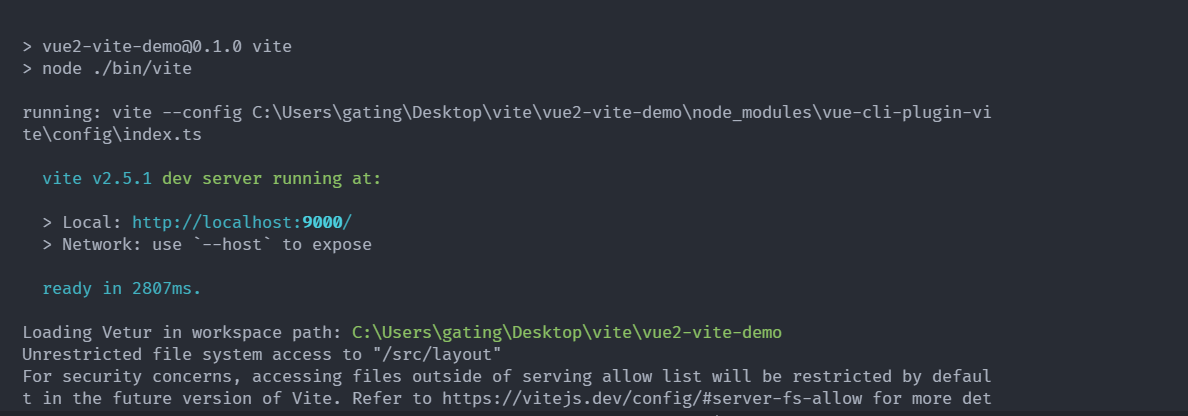
Unrestricted file system access to "/src/layout",這個報錯說明找不到這個文件,可是我們看,我們明明有layout/index.vue,但是卻報找不到,這是為什么呢?這是因為 Vite 的 resolve.extensions 默認的 .vue 的后綴名,官方也不推薦自定義導入類型的擴展名,因為它會影響 IDE 和類型支持。(查看鏈接)
當然,我們為了兼容以前的舊項目,還是需要配置的,所以我們需要更新下我們的配置,在vue.config.js中補上 resolve.extensions 的配置,代碼如下:
module.exports = {
  // ...
  configureWebpack: {
    resolve: {
      extensions: [".mjs", ".js", ".ts", ".jsx", ".tsx", ".json", ".vue"],
    },
  },
  // ...
};
ps: 小插曲,之前測試的時候發現配了 resolve.extensions 也沒有效果,然后翻閱 Vite 文檔,發現 Vite 是支持的,但是 vue-cli-plugin-vite 不支持,所以我給作者提了個 Issue,現在也支持了,感謝作者~~
JSX 語法處理
添加完后,再次運行:
npm run vite
發現又報了如下錯誤:

翻譯來說就是說你在 .vue 文件中用了無效的 js 語法(即 JSX),這里就就需要我們在 vue 的 sfc 組件中還得加上 jsx 標識,即(src/components/HelloWorld.vue):
<script lang="jsx">
  import Test from "./Test";
  export default {
    name: "HelloWorld",
    components: {
      Test,
      TestJsx: {
        render() {
          return <div>我是vue文件的JSX渲染的</div>;
        },
      },
    },
    props: {
      msg: String,
    },
  };
</script>
修改完后再次運行,發現又報錯了,而且這個錯誤和上面的還很類似。不過只是說我們在 .js 文件中用了無效的 js 語法(即 JSX),如果您使用的是 JSX 請確保將文件命名為.JSX 或.tsx 擴展名。
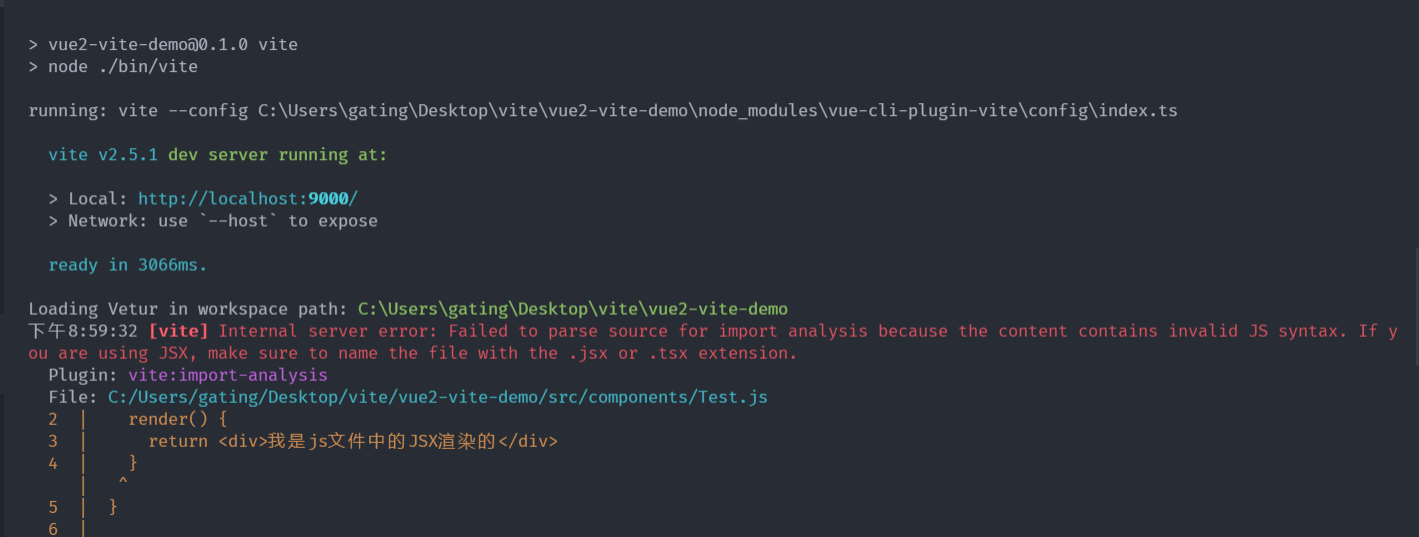
js 中不支持 jsx 的原因,尤大也在 issue 有過說明,具體參考這個鏈接
所以,我們只需要把 .js 文件的后綴名修改為 .jsx 即可
修改完后,再次運行:
npm run vite
這里會發現,瀏覽器報 require is not defined,這里我們先把 Home.vue 文件的 require 注釋掉先(require 的問題下面會講到),代碼如下:
<script>
  // @ is an alias to /src
  import HelloWorld from "@comp/HelloWorld";
  // const { sum } = require('../utils/index')

  export default {
    name: "Home",
    components: {
      HelloWorld,
    },
    methods: {
      handleClick() {
        // console.log(sum(1, 32))
      },
    },
  };
</script>
出現如下報錯:
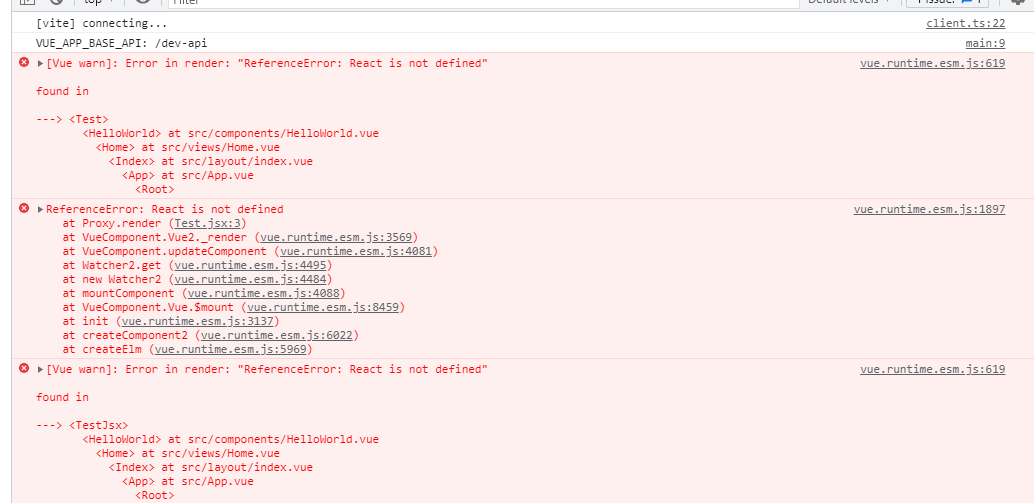
因為我們雖然設置了一堆使用 jsx 的配置,但是沒有在插件上配置開啟 jsx(即不設置 vitePluginVue2Options: { jsx: true }),所以需要在 vue.config.js 編寫下 vite 的配置啦(終於開始配置 vite 了),相關 issue
module.exports = {
  pluginOptions: {
    vite: {
      /**
       * Plugin[]
       * @default []
       */
      plugins: [], // other vite plugins list, will be merge into this plugin\'s underlying vite.config.ts
      /**
       * Vite UserConfig.optimizeDeps options
       * recommended set `include` for speedup page-loaded time, e.g. include: ['vue', 'vue-router', '@scope/xxx']
       * @default {}
       */
      optimizeDeps: {},
      /**
       * type-checker, recommended disabled for large-scale old project.
       * @default false
       */
      disabledTypeChecker: true,
      /**
       * lint code by eslint
       * @default false
       */
      disabledLint: false,
      /**
       * enable css-loader url resolve compat
       * disabled it if you do not use `~@/assets/logo.png` for better performance.
       * @default true
       */
      cssLoaderCompat: true,
      vitePluginVue2Options: {
        jsx: true,
      },
    },
  },
};
再次運行,發現可以打開頁面了
總結:在 vite 中使用 jsx 還是稍微有點麻煩的,一是使用到 jsx 語法的 js 文件都必須改成使用 jsx 后綴名,二是在 vue 的 sfc 組件中還得加上 jsx 標識(僅僅引入一個 .jsx 文件 不需要加上)
require 語法處理
把 require 的注釋打開,再次運行,f12 打開控制台,出現如下錯誤:

因為 vite 不支持 require 的,那么怎么解決呢?這時候就需要使用 vite 插件了。
這里說說我是怎么找這些插件的吧,通常不知道怎么辦的時候,就去 npm 搜索一下關鍵字 vite commonjs,然后看下這些插件的下載量,率先選擇最高的那個使用,這里發現 @originjs/vite-plugin-commonjs 這個周下載量有 2000+。所以這里就嘗試使用這個了,發現一試還真成了。
所以,接下來就跟着我一起安裝並且配置一下吧。
npm install @originjs/vite-plugin-commonjs -D
const { viteCommonjs } = require("@originjs/vite-plugin-commonjs");
module.exports = {
  pluginOptions: {
    vite: {
      plugins: [
        viteCommonjs({
          // lodash不需要進行轉換
          exclude: ["lodash"],
        }),
      ],
    },
  },
};
ps: 但是標簽上的 require 並不支持,所以建議全面擁抱 ES Module
ps: 路由使用
resolve => require(['../components/views/Home.vue'], resolve)導入的,可以通過 vscode 使用下面的正則全局替換
搜索:\(?resolve\)?\s*=>\s*require\(\[(.\*)\], resolve\)
替換:() => import($1)
scss 變量注入
重新運行一下,發現啥問題都沒有,看着一切正常,這時候我覺得 HelloWorld 組件缺點樣式,我想美化一樣,比如修改下字體顏色、文字大小啥的。
所以我對 HelloWorld 組件添加了樣式,進行了如下修改:
<template>
  <div class="hello">
    <h1 class="h1">{{ msg }}</h1>
    <test />
    <test-jsx />
  </div>
</template>

<script lang="jsx">
  import Test from "./Test";
  export default {
    name: "HelloWorld",
    components: {
      Test,
      TestJsx: {
        render() {
          return <div>我是vue文件的JSX渲染的</div>;
        },
      },
    },
    props: {
      msg: String,
    },
  };
</script>

<style lang="scss" scoped>
  .h1 {
    font-size: 30px;
    color: skyblue;
  }
  .hello {
    @include bgCover("@/assets/logo.png");
  }
</style>
還沒開始寫呢,控制台就一堆報錯:
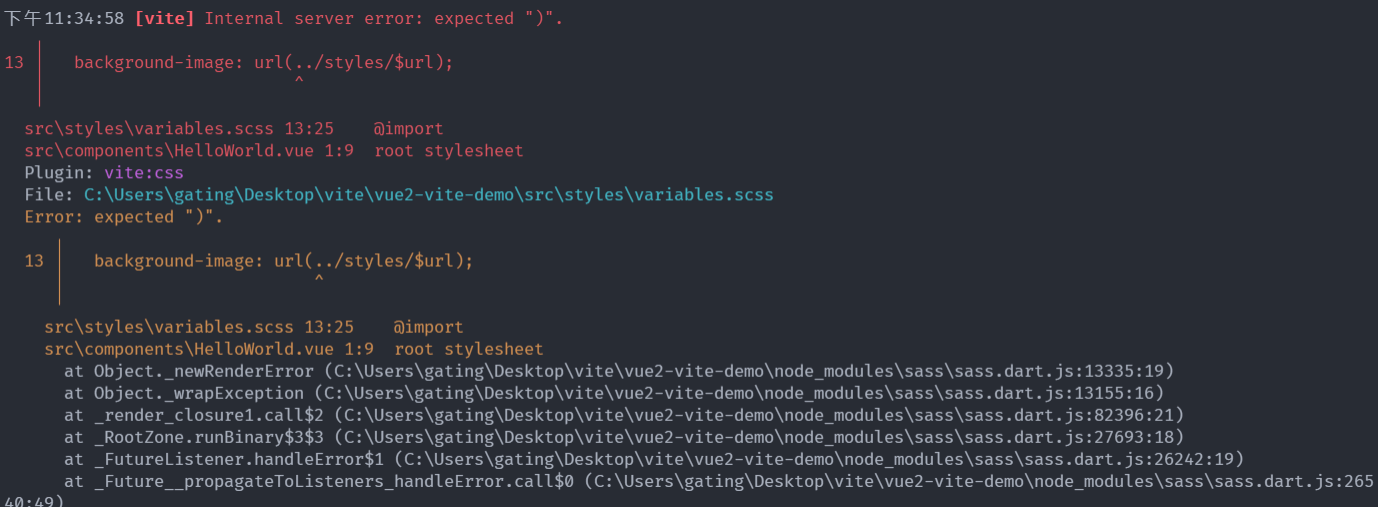
猜測是使用了別名導入 scss 后,識別到 url() 后就會輸出相對路徑,所以這邊在 vite 環境時候,使用 src/styles 導入即可,具體 vue.config.js 修改如下:
// npm 正在執行哪個 script,npm_lifecycle_event 就返回當前正在運行的腳本名稱。
const isVite = process.env.npm_lifecycle_event.startsWith("vite");

// 兼容vite
function getAdditionalData(str) {
  if (isVite) {
    return str.replace(/@style\//, "src/styles/");
  }
  return str;
}

module.exports = {
  css: {
    requireModuleExtension: true,
    loaderOptions: {
      scss: {
        // 注意:在 sass-loader v7 中,這個選項名是 "data" 官網文檔還是prependData   此項目用的7+版本
        // 注意:在 sass-loader v10 使用 additionalData,這里為了兼容vite,所以升級了sass-loader@10
        additionalData: getAdditionalData(`@import '@style/variables.scss';`),
      },
    },
  },
};
ps: 這里也有個小知識點,我們可以通過 npm_lifecycle_event 來獲取我們執行了的腳本名稱,通過 npm_lifecycle_script 獲取執行了什么命令
script 指定環境
通常我們會有 beta、pre、dev 好幾個環境,在 vue-cli 開發的時候我們通過會通過 --mode env 指定我們本地的開發環境,現在我們也嘗試在 scripts 中的 vite 指定 staging 環境,發現並沒有效果:
{
  "scripts": {
    "vite": "node ./bin/vite --mode staging"
  }
}
這是為什么呢?打開 bin/vite 文件一看,發現 使用 cross-spawn 執行腳本的,所以 --mode staging 這個參數根本就沒有獲取,那么我們怎么可以獲取呢?
其實我們可以通過 process.argv 獲取我們執行的命令的參數,打印一下發現 argv 是個數組,而我們需要的是最后那兩個,所以這里需要進行如下修改(bin/vite):
#!/usr/bin/env node

const path = require("path");
const spawn = require("cross-spawn");
const configPath = require.resolve("vue-cli-plugin-vite/config/index.ts");
const cwd = path.resolve(__dirname, "../");

const params = [
  `${process.env.BUILD ? "build" : ""}`,
  process.env.VITE_DEBUG ? "--debug" : "",
  "--config",
  `${configPath}`,
  ...process.argv.slice(2),
].filter(Boolean);

console.log(`running: vite ${params.join(" ")}`);
const serveService = spawn("vite", params, {
  cwd,
  stdio: "inherit",
});

serveService.on("close", (code) => {
  process.exit(code);
});
至此,我們的 vite 命令也可以指定開發環境啦 😉
額外知識點 - keep-alive 使用動態 key 時,熱更新無效
一般的后台管理肯定需要 keep-alive 這個組件,比如我們 layout 組件上就是用了 keep-alive,但是你會發現在你使用 keep-alive 的時候,頁面卻沒有熱更新,這個不是 vite 的問題,也不是 webpack 的問題,這是 Vue 的問題(當然也有相關 issue),而且這個 issue 已經從 18 年就開始有了,且現在仍然是 open 狀態(相關 issue)
參考評論和 issue,我們也可以編寫一個只在開發環境中使用的 keep-alive 組件了。
創建 plugins/keep-alive.js 文件,編寫如下代碼:
import { isArray, isRegExp } from "lodash";
function remove(arr, item) {
  if (arr.length) {
    var index = arr.indexOf(item);
    if (index > -1) {
      return arr.splice(index, 1);
    }
  }
}
function isDef(v) {
  return v !== undefined && v !== null;
}
function isAsyncPlaceholder(node) {
  return node.isComment && node.asyncFactory;
}

function getFirstComponentChild(children) {
  if (isArray(children)) {
    for (let i = 0; i < children.length; i++) {
      let c = children[i];
      if (isDef(c) && (isDef(c.componentOptions) || isAsyncPlaceholder(c))) {
        return c;
      }
    }
  }
}

function getComponentName(opts) {
  return opts && (opts.Ctor.options.name || opts.tag);
}

function matches(pattern) {
  if (isArray(pattern)) {
    return pattern.indexOf(name) > -1;
  } else if (typeof pattern === "string") {
    return pattern.split(",").indexOf(name) > -1;
  } else if (isRegExp(pattern)) {
    return pattern.test(name);
  }
  /* istanbul ignore next */
  return false;
}

function pruneCache(keepAliveInstance, filter) {
  const { cache, keys, _vnode } = keepAliveInstance;
  for (const key in cache) {
    const entry = cache[key];
    if (entry) {
      const name = entry.name;
      if (name && !filter(name)) {
        pruneCacheEntry(cache, key, keys, _vnode);
      }
    }
  }
}

function pruneCacheEntry(cache, key, keys, current) {
  const entry = cache[key];
  if (entry && (!current || entry.tag !== current.tag)) {
    entry.componentInstance.$destroy();
  }
  cache[key] = null;
  remove(keys, key);
}

export default {
  install(app) {
    //只在開發模式下生效
    if (process.env.NODE_ENV === "development") {
      /**
       * Remove an item from an array.
       */

      const patternTypes = [String, RegExp, Array];

      const KeepAlive = {
        name: "keep-alive",
        abstract: true,

        props: {
          include: patternTypes,
          exclude: patternTypes,
          max: [String, Number],
        },

        methods: {
          cacheVNode() {
            const { cache, keys, vnodeToCache, keyToCache } = this;
            if (vnodeToCache) {
              const { tag, componentInstance, componentOptions } = vnodeToCache;
              cache[keyToCache] = {
                name: getComponentName(componentOptions),
                tag,
                componentInstance,
                cid: vnodeToCache.cid,
              };
              keys.push(keyToCache);
              // prune oldest entry
              if (this.max && keys.length > parseInt(this.max)) {
                pruneCacheEntry(cache, keys[0], keys, this._vnode);
              }
              this.vnodeToCache = null;
            }
          },
        },

        created() {
          this.cache = Object.create(null);
          this.keys = [];
        },

        destroyed() {
          for (const key in this.cache) {
            pruneCacheEntry(this.cache, key, this.keys);
          }
        },

        mounted() {
          this.cacheVNode();
          this.$watch("include", (val) => {
            pruneCache(this, (name) => matches(val, name));
          });
          this.$watch("exclude", (val) => {
            pruneCache(this, (name) => !matches(val, name));
          });
        },

        updated() {
          this.cacheVNode();
        },

        render() {
          const slot = this.$slots.default;
          const vnode = getFirstComponentChild(slot);
          const componentOptions = vnode && vnode.componentOptions;
          if (componentOptions) {
            vnode.cid = componentOptions.Ctor.cid;
            // check pattern
            const name = getComponentName(componentOptions);
            const { include, exclude } = this;
            if (
              // not included
              (include && (!name || !matches(include, name))) ||
              // excluded
              (exclude && name && matches(exclude, name))
            ) {
              return vnode;
            }
            const { cache, keys } = this;
            const key =
              vnode.key == null
                ? // same constructor may get registered as different local components
                  // so cid alone is not enough (#3269)
                  componentOptions.Ctor.cid +
                  (componentOptions.tag ? `::${componentOptions.tag}` : "")
                : vnode.key;
            if (cache[key]) {
              if (vnode.cid === cache[key].cid) {
                vnode.componentInstance = cache[key].componentInstance;
                // make current key freshest
                remove(keys, key);
                keys.push(key);
              } else {
                cache[key].componentInstance.$destroy();
                cache[key] = vnode;
              }
            } else {
              // delay setting the cache until update
              this.vnodeToCache = vnode;
              this.keyToCache = key;
            }
            vnode.data.keepAlive = true;
          }
          return vnode || (slot && slot[0]);
        },
      };

      app.component("keep-alive", KeepAlive);
    }
  },
};
在 main.js 引入:
import KeepAlive from "./plugins/keep-alive";
Vue.use(KeepAlive);
這樣子,我們的 keep-alive 就具有熱更新功能啦ヾ(≧▽≦*)
未解決的問題
ps: vue-cli-plugin-vite 插件中的 vite 是鎖定 vite@2.5.1 版本的相關 issue,而這個 issue 的 相關 pr 是 2.5.3 版本才 merge,不過我嘗試使用 vite@2.5.3 也沒有成功
ps: 看了下源代碼,github上的源碼已經 merge 了,但是 npm 上部分包仍然沒有發布,比如@vitejs/plugin-vue、@vitejs/plugin-vue-jsx,猜測下個版本應該就能實現 jsx in sfc 的熱更新了 😍。
不過我們也可以將 pr 的源碼復制到 node_modules 里也可提前體驗 jsx in sfc 的熱更新🤞
總結
雖然- -這里沒有用實際項目對比,也沒有實際的數據對比,但是大家可以 download 那個配置在自己項目體驗一下,遷移起來還是比較簡單的。如果有什么問題歡迎大家留言進行交流~~
最后再強調,在 vite 中使用 jsx 語法的話,一是使用到 jsx 語法的 js 文件都必須改成使用 jsx 后綴名,二是在 vue 的 sfc 組件中還得加上 jsx 標識(僅僅引入一個 .jsx 文件 不需要加上)
倉庫代碼鏈接如下:
最后
雖然本文羅嗦了點,但還是感謝各位觀眾老爺的能看到最后 O(∩_∩)O 希望你能有所收獲 😁