
一、什么是抽象語法樹
在計算機科學中,抽象語法樹(abstract syntax tree 或者縮寫為 AST),或者語法樹(syntax tree),是源代碼的抽象語法結構的樹狀表現形式,這里特指編程語言的源代碼。樹上的每個節點都表示源代碼中的一種結構。
之所以說語法是「抽象」的,是因為這里的語法並不會表示出真實語法中出現的每個細節。
二、使用場景
- JS 反編譯,語法解析
- Babel 編譯 ES6 語法
- 代碼高亮
- 關鍵字匹配
- 作用域判斷
- 代碼壓縮
如果你是一名前端開發,一定用過或者聽過babel、eslint、prettier等工具,它們對靜態代碼進行翻譯、格式化、代碼檢查,在我們的日常開發中扮演了重要的角色,這些工具無一例外的應用了AST。  前端開發中依賴的AST工具集合
 這里不得不拉出來介紹一下的是Babel,從ECMAScript的誕生后,它便充當了代碼和運行環境的翻譯官,讓我們隨心所欲的使用js的新語法進行代碼編寫。
-
那么Babel是怎么進行代碼翻譯的呢?
如下圖所示,Babylon首先解析(parse)階段會生成AST,然后babel-transform對AST進行變換(transform),最后使用babel-generate生成目標代碼(generate)。
 babel
babel 我們用一個小例子來看一下,例如我們想把
const nokk = 5;中的變量標識符nokk逆序, 變成const kkon = 5Step Parse
const babylon = require('babylon')

const code = `
  const nokk = 5;
`
const ast = babylon.parse(code)
console.log('%o', ast)
Step Transform
const traverse = require('@babel/traverse').default

traverse(ast, {
  enter(path) {
    if (path.node.type === 'Identifier') {
      path.node.name = path.node.name
        .split('')
        .reverse()
        .join('')
    }
  }
})
Step Generate
const generator = require('@babel/generator').default

const targetCode = generator(ast)
console.log(targetCode)

// { code: 'const kkon = "water";', map: null, rawMappings: null }
 1 const babel = require('babel-core'); //babel核心解析庫
 2 const t = require('babel-types'); //babel類型轉化庫
 3 let code = `let sum = (a, b)=> a+b`;
 4 let ArrowPlugins = {
 5 //訪問者模式
 6   visitor: {
 7   //捕獲匹配的API
 8     ArrowFunctionExpression(path) {
 9       let { node } = path;
10       let params = node.params;
11       let body = node.body;
12       if(!t.isBlockStatement(body)){
13         let returnStatement = t.returnStatement(body);
14         body = t.blockStatement([returnStatement]);
15       }
16       let r = t.functionExpression(null, params, body, false, false);
17       path.replaceWith(r);
18     }
19   }
20 }
21 let d = babel.transform(code, {
22   plugins: [
23     ArrowPlugins
24   ]
25 })
26 console.log(d.code);
看看輸出結果:
1 let sum = function (a, b) {
2   return a + b;
3 };
三、AST Explorer
四、深入原理
可視化的工具可以讓我們迅速有感官認識,那么具體內部是如何實現的呢?
繼續使用上文的例子:
1 Function getAST(){}JSON也很簡單:
 1 {
 2   "type": "Program",
 3   "start": 0,
 4   "end": 19,
 5   "body": [
 6     {
 7       "type": "FunctionDeclaration",
 8       "start": 0,
 9       "end": 19,
10       "id": {
11         "type": "Identifier",
12         "start": 9,
13         "end": 15,
14         "name": "getAST"
15       },
16       "expression": false,
17       "generator": false,
18       "params": [],
19       "body": {
20         "type": "BlockStatement",
21         "start": 17,
22         "end": 19,
23         "body": []
24       }
25     }
26   ],
27   "sourceType": "module"
28 }
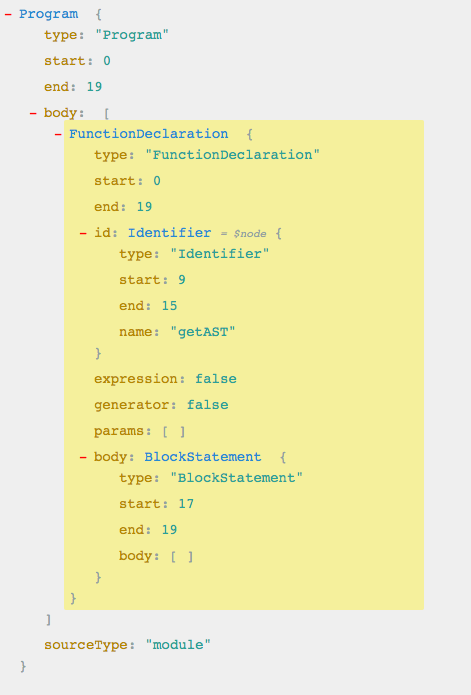
懷着好奇的心態,我們來模擬一下用代碼實現:
 1 const esprima = require('esprima'); //解析js的語法的包
 2 const estraverse = require('estraverse'); //遍歷樹的包
 3 const escodegen = require('escodegen'); //生成新的樹的包
 4 let code = `function getAST(){}`;
 5 //解析js的語法
 6 let tree = esprima.parseScript(code);
 7 //遍歷樹
 8 estraverse.traverse(tree, {
 9   enter(node) {
10     console.log('enter: ' + node.type);
11   },
12   leave(node) {
13     console.log('leave: ' + node.type);
14   }
15 });
16 //生成新的樹
17 let r = escodegen.generate(tree);
18 console.log(r);
運行后,輸出:
 1 enter: Program
 2 enter: FunctionDeclaration
 3 enter: Identifier
 4 leave: Identifier
 5 enter: BlockStatement
 6 leave: BlockStatement
 7 leave: FunctionDeclaration
 8 leave: Program
 9 function getAST() {
10 }
我們看到了遍歷語法樹的過程,這里應該是深度優先遍歷。
稍作修改,我們來改變函數的名字
getAST => Jartto:
 1 const esprima = require('esprima'); //解析js的語法的包
 2 const estraverse = require('estraverse'); //遍歷樹的包
 3 const escodegen = require('escodegen'); //生成新的樹的包
 4 let code = `function getAST(){}`;
 5 //解析js的語法
 6 let tree = esprima.parseScript(code);
 7 //遍歷樹
 8 estraverse.traverse(tree, {
 9   enter(node) {
10     console.log('enter: ' + node.type);
11     if (node.type === 'Identifier') {
12       node.name = 'Jartto';
13     }
14   }
15 });
16 //生成新的樹
17 let r = escodegen.generate(tree);
18 console.log(r);
運行后,輸出:
1 enter: Program
2 enter: FunctionDeclaration
3 enter: Identifier
4 enter: BlockStatement
5 function Jartto() {
6 }
可以看到,在我們的干預下,輸出的結果發生了變化,方法名編譯后方法名變成了
Jartto。這就是抽象語法樹的強大之處,本質上通過編譯,我們可以去改變任何輸出結果。
補充一點:關於
node類型,全集大致如下:(parameter) node: Identifier | SimpleLiteral | RegExpLiteral | Program | FunctionDeclaration | FunctionExpression | ArrowFunctionExpression | SwitchCase | CatchClause | VariableDeclarator | ExpressionStatement | BlockStatement | EmptyStatement | DebuggerStatement | WithStatement | ReturnStatement | LabeledStatement | BreakStatement | ContinueStatement | IfStatement | SwitchStatement | ThrowStatement | TryStatement | WhileStatement | DoWhileStatement | ForStatement | ForInStatement | ForOfStatement | VariableDeclaration | ClassDeclaration | ThisExpression | ArrayExpression | ObjectExpression | YieldExpression | UnaryExpression | UpdateExpression | BinaryExpression | AssignmentExpression | LogicalExpression | MemberExpression | ConditionalExpression | SimpleCallExpression | NewExpression | SequenceExpression | TemplateLiteral | TaggedTemplateExpression | ClassExpression | MetaProperty | AwaitExpression | Property | AssignmentProperty | Super | TemplateElement | SpreadElement | ObjectPattern | ArrayPattern | RestElement | AssignmentPattern | ClassBody | MethodDefinition | ImportDeclaration | ExportNamedDeclaration | ExportDefaultDeclaration | ExportAllDeclaration | ImportSpecifier | ImportDefaultSpecifier | ImportNamespaceSpecifier | ExportSpecifier
說到這里,聰明的你,可能想到了
Babel,想到了js混淆,想到了更多背后的東西。接下來,我們要介紹介紹Babel是如何將ES6轉成ES5的。esprima、estraverse 和 escodegen
esprima、estraverse和escodegen模塊是操作 AST 的三個重要模塊,也是實現babel的核心依賴,下面是分別介紹三個模塊的作用。1、esprima 將 JS 轉換成 AST
esprima 模塊的用法如下:
// 文件:esprima-test.js const esprima = require("esprima"); let code = "function fn() {}"; // 生成語法樹 let tree = esprima.parseScript(code); console.log(tree); // Script { // type: 'Program', // body: // [ FunctionDeclaration { // type: 'FunctionDeclaration', // id: [Identifier], // params: [], // body: [BlockStatement], // generator: false, // expression: false, // async: false } ], // sourceType: 'script' }通過上面的案例可以看出,通過
esprima模塊的parseScript方法將 JS 代碼塊轉換成語法樹,代碼塊需要轉換成字符串,也可以通過parseModule方法轉換一個模塊。2、estraverse 遍歷和修改 AST
查看遍歷過程:
// 文件:estraverse-test.js
const esprima = require("esprima");
const estraverse = require("estraverse");

let code = "function fn() {}";

// 遍歷語法樹
estraverse.traverse(esprima.parseScript(code), {
    enter(node) {
        console.log("enter", node.type);
    },
    leave() {
        console.log("leave", node.type);
    }
});

// enter Program
// enter FunctionDeclaration
// enter Identifier
// leave Identifier
// enter BlockStatement
// leave BlockStatement
// leave FunctionDeclaration
// leave Program
上面代碼通過
estraverse模塊的traverse方法將esprima模塊轉換的 AST 進行了遍歷,並打印了所有的type屬性並打印,每含有一個type屬性的對象被叫做一個節點,修改是獲取對應的類型並修改該節點中的屬性即可。其實深度遍歷 AST 就是在遍歷每一層的
type屬性,所以遍歷會分為兩個階段,進入階段和離開階段,在estraverse的traverse方法中分別用參數指定的entry和leave兩個函數監聽,但是我們一般只使用entry。3、escodegen 將 AST 轉換成 JS
下面的案例是一個段 JS 代碼塊被轉換成 AST,並將遍歷、修改后的 AST 重新轉換成 JS 的全過程。
// 文件:escodegen-test.js
const esprima = require("esprima");
const estraverse = require("estraverse");
const escodegen = require("escodegen");

let code = "function fn() {}";

// 生成語法樹
let tree = esprima.parseScript(code);

// 遍歷語法樹
estraverse.traverse(tree, {
    enter(node) {
        // 修改函數名
        if (node.type === "FunctionDeclaration") {
            node.id.name = "ast";
        }
    }
});

// 編譯語法樹
let result = escodegen.generate(tree);

console.log(result);

// function ast() {
// }
在遍歷 AST 的過程中
params值為數組,沒有type屬性。實現 Babel 語法轉換插件
實現語法轉換插件需要借助
babel-core和babel-types兩個模塊,其實這兩個模塊就是依賴esprima、estraverse和escodegen的。使用這兩個模塊需要安裝,命令如下:
npm install babel-core babel-types
1、plugin-transform-arrow-functions
plugin-transform-arrow-functions是 Babel 家族成員之一,用於將箭頭函數轉換 ES5 語法的函數表達式。// 文件:plugin-transform-arrow-functions.js const babel = require("babel-core"); const types = require("babel-types"); // 箭頭函數代碼塊 let sumCode = ` const sum = (a, b) => { return a + b; }`; let minusCode = `const minus = (a, b) => a - b;`; // 轉化 ES5 插件 let ArrowPlugin = { // 訪問者(訪問者模式) visitor: { // path 是樹的路徑 ArrowFunctionExpression(path) { // 獲取樹節點 let node = path.node; // 獲取參數和函數體 let params = node.params; let body = node.body; // 判斷函數體是否是代碼塊,不是代碼塊則添加 return 和 {} if (!types.isBlockStatement(body)) { let returnStatement = types.returnStatement(body); body = types.blockStatement([returnStatement]); } // 生成一個函數表達式樹結構 let func = types.functionExpression(null, params, body, false, false); // 用新的樹結構替換掉舊的樹結構 types.replaceWith(func); } } }; // 生成轉換后的代碼塊 let sumResult = babel.transform(sumCode, { plugins: [ArrowPlugin] }); let minusResult = babel.transform(minusCode, { plugins: [ArrowPlugin] }); console.log(sumResult.code); console.log(minusResult.code); // let sum = function (a, b) { // return a + b; // }; // let minus = function (a, b) { // return a - b; // };我們主要使用
babel-core的transform方法將 AST 轉化成代碼塊,第一個參數為轉換前的代碼塊(字符串),第二個參數為配置項,其中plugins值為數組,存儲修改babal-core轉換的 AST 的插件(對象),使用transform方法將舊的 AST 處理成新的代碼塊后,返回值為一個對象,對象的code屬性為轉換后的代碼塊(字符串)。內部修改通過
babel-types模塊提供的方法實現,API 可以到 https://github.com/babel/babe... 中查看。ArrowPlugin就是傳入transform方法的插件,必須含有visitor屬性(固定),值同為對象,用於存儲修改語法樹的方法,方法名要嚴格按照 API,對應的方法會修改 AST 對應的節點。在
types.functionExpression方法中參數分別代表,函數名(匿名函數為null)、函數參數(必填)、函數體(必填)、是否為generator函數(默認false)、是否為async函數(默認false),返回值為修改后的 AST,types.replaceWith方法用於替換 AST,參數為新的 AST。2、plugin-transform-classes
plugin-transform-classes也是 Babel 家族中的成員之一,用於將 ES6 的class類轉換成 ES5 的構造函數。// 文件:plugin-transform-classes.js const babel = require("babel-core"); const types = require("babel-types"); // 類 let code = ` class Person { constructor(name) { this.name = name; } getName () { return this.name; } }`; // 將類轉化 ES5 構造函數插件 let ClassPlugin = { visitor: { ClassDeclaration(path) { let node = path.node; let classList = node.body.body; // 將取到的類名轉換成標識符 { type: 'Identifier', name: 'Person' } let className = types.identifier(node.id.name); let body = types.blockStatement([]); let func = types.functionDeclaration(className, [], body, false, false); path.replaceWith(func); // 用於存儲多個原型方法 let es5Func = []; // 獲取 class 中的代碼體 classList.forEach((item, index) => { // 函數的代碼體 let body = classList[index].body; // 獲取參數 let params = item.params.length ? item.params.map(val => val.name) : []; // 轉化參數為標識符 params = types.identifier(params); // 判斷是否是 constructor,如果構造函數那就生成新的函數替換 if (item.kind === "constructor") { // 生成一個構造函數樹結構 func = types.functionDeclaration(className, [params], body, false, false); } else { // 其他情況是原型方法 let proto = types.memberExpression(className, types.identifier("prototype")); // 左側層層定義標識符 Person.prototype.getName let left = types.memberExpression(proto, types.identifier(item.key.name)); // 右側定義匿名函數 let right = types.functionExpression(null, [params], body, false, false); // 將左側和右側進行合並並存入數組 es5Func.push(types.assignmentExpression("=", left, right)); } }); // 如果沒有原型方法,直接替換 if (es5Func.length === 0) { path.replaceWith(func); } else { es5Func.push(func); // 替換 n 個節點 path.replaceWithMultiple(es5Func); } } } }; // 生成轉換后的代碼塊 result = babel.transform(code, { plugins: [ClassPlugin] }); console.log(result.code); // Person.prototype.getName = function () { // return this.name; // } // function Person(name) { // this.name = name; // }上面這個插件的實現要比
plugin-transform-arrow-functions復雜一些,歸根結底還是將要互相轉換的 ES6 和 ES5 語法樹做對比,找到他們的不同,並使用babel-types提供的 API 對語法樹對應的節點屬性進行修改並替換語法樹,值得注意的是path.replaceWithMultiple與path.replaceWith不同,參數為一個數組,數組支持多個語法樹結構,可根據具體修改語法樹的場景選擇使用,也可根據不同情況使用不同的替換方法。