
1:什么是監控?
監控: 生活中的監控, 事后追責
linux監控: 事后追責,實時監控,事前預警,性能分析
2:常見的linux監控命令
cpu: top uptime vmstat
mem free
disk df du
進程 ps pstree
網絡 iftop nethogs
查看日志
3:使用shell腳本來監控服務器
#!/bin/bash
avai_mem=`free -m|awk '/Mem/{print $NF}'`
if [ $avai_mem -lt 1000 ];then
   #mail
fi
4: zabbix的基礎服務架構

5: zabbix生產環境安裝
選版本
安裝依賴
#安裝php72w和nginx
cd /etc/yum.repos.d/
rm -fr local.repo
curl -o /etc/yum.repos.d/CentOS-Base.repo http://mirrors.aliyun.com/repo/Centos-7.repo
curl -o /etc/yum.repos.d/epel.repo http://mirrors.aliyun.com/repo/epel-7.repo
wget http://mirror.webtatic.com/yum/el7/webtatic-release.rpm
yum localinstall webtatic-release.rpm -y
yum install php72w-fpm php72w-cli nginx -y
#安裝php依賴
yum install php72w-mysqli php72w-bcmath php72w-gd php72w-mbstring  php72w-xml php72w-ldap -y
#配置nginx和php
vim  /etc/php-fpm.d/www.conf
[root@monitor ~]# grep -Ev "^$|;" /etc/php-fpm.d/www.conf
[www]
user = nginx
group = nginx
listen = 127.0.0.1:9000
[root@monitor ~]# grep -Ev "^$|;"  /etc/php.ini
[PHP]
max_execution_time = 300
max_input_time = 300
post_max_size = 16M
[Date]
date.timezone = Asia/Shanghai
#nginx配置文件
[root@monitor ~]# grep -Ev "^$|#"  /etc/nginx/nginx.conf
worker_processes  1;
events {
    worker_connections  1024;
}
http {
    include       mime.types;
    default_type  application/octet-stream;
    sendfile        on;
    keepalive_timeout  65;
    server {
        listen       80;
        server_name  localhost;
        location / {
            root   /data/zbx/html;
            index  index.php index.html index.htm;
        }
        error_page   500 502 503 504  /50x.html;
        location = /50x.html {
            root   html;
        }
	location ~ \.php$ {
            root           html;
            fastcgi_pass   127.0.0.1:9000;
            fastcgi_index  index.php;
            fastcgi_param  SCRIPT_FILENAME  /data/zbx/html$fastcgi_script_name;
            include        fastcgi_params;
        }
    }
}
#准備zabbix-web的源代碼
wget  https://cdn.zabbix.com/zabbix/sources/stable/5.0/zabbix-5.0.5.tar.gz
tar xf zabbix-5.0.5.tar.gz
cd zabbix-5.0.5/
cp -a ui/* /html/
chown -R nginx:nginx /html/
mkdir /var/lib/php/session
chown -R nginx:nginx /var/lib/php/session
#安裝數據庫
yum install mariadb-server.x86_64 -y
systemctl start mariadb.service
systemctl enable mariadb.service
mysql_secure_installation
mysql
MariaDB [(none)]> create database zabbix character set utf8 collate utf8_bin;
Query OK, 1 row affected (0.00 sec)
MariaDB [(none)]> grant all privileges on zabbix.* to 'zabbix'@'localhost' identified by '123456';
Query OK, 0 rows affected (0.00 sec)
#安裝zabbix-server
rpm -ivh  https://mirror.tuna.tsinghua.edu.cn/zabbix/zabbix/5.0/rhel/7/x86_64/zabbix-release-5.0-1.el7.noarch.rpm
yum install zabbix-server-mysql -y
zcat /usr/share/doc/zabbix-server-mysql-5.0.5/create.sql.gz|mysql -uzabbix -p123456  zabbix
#配置zabbix-server
[root@monitor zabbix]# grep -Ev "^$|#" zabbix_server.conf
LogFile=/var/log/zabbix/zabbix_server.log
LogFileSize=0
PidFile=/var/run/zabbix/zabbix_server.pid
SocketDir=/var/run/zabbix
DBName=zabbix
DBUser=zabbix
DBPassword=123456
SNMPTrapperFile=/var/log/snmptrap/snmptrap.log
Timeout=4
AlertScriptsPath=/usr/lib/zabbix/alertscripts
ExternalScripts=/usr/lib/zabbix/externalscripts
LogSlowQueries=3000
StatsAllowedIP=127.0.0.1
#啟動zabbix-server
systemctl start zabbix-server.service
systemctl enable zabbix-server.service
#繼續zabbix-web安裝
6∶監控一台服務器主機
rpm -ivh https://mirror.tuna.tsinghua.edu.cn/zabbix/zabbix/5.0/rhel/7/x86_64/zabbix-agent2-5.0.5-1.el7.x86_64.rpm
vim /etc/zabbix/zabbix_agent2.conf
Server=10.0.0.71
systemctl start zabbix-agent2.service
systemctl enable zabbix-agent2.service
zabbix-web
配置--主機--創建主機(右上角)
輸入主機名稱--群組--客戶端ip地址--模板--關聯Template OS Linux by Zabbix agent

7∶自定義監控項
#agent端配置
vim /etc/zabbix/zabbix_agent2.d/zbx_nginx.conf
UserParameter=nginx_alive,ps -ef|grep -v grep|grep -c nginx
systemctl restart zabbix-agent2.service

#zabbix-server測試
zabbix_get -s 10.0.0.8 -k nginx_alive
zabbix-web
配置--主機--10.0.0.8--監控項--創建監控項

8∶自定義觸發器
配置--主機--10.0.0.8--觸發器--創建觸發器
#觸發器表達式
#最新值
{主機名稱:key值.last()}=0
#平均值
{主機名稱:key值.avg(5m)}=0
#count計數
{主機名稱:key值.count(1m,10)}=0
#diff對比
{主機名稱:key值.diff(1m,10)}=0

9:自定義報警
郵件報警
1:自定義發件人
管理--報警媒介類型--Email

收件人配置

配置動作

3:啟動發消息的動作
配置---動作--啟動動作
微信報警
1:申請企業微信
2:准備微信報警腳本
vim  weixin.py
#企業id
corpid='wxd074861951c67ba6'
#應用的秘鑰
appsecret='QtraZrI936DZ0jZ3aSWTZ2CsAePgZUn_5jZhgudChtI'
#應用的編號
agentid=1
yum install python2-pip -y
pip install requests
python weixin.py t296917342  '口令'  '今晚打老虎'
#!/usr/bin/env python
#-*- coding: utf-8 -*-
#author: bgx
#date: 2018
#comment: zabbix接入微信報警腳本

import requests
import sys
import os
import json
import logging

logging.basicConfig(level = logging.DEBUG, format = '%(asctime)s, %(filename)s, %(levelname)s, %(message)s',
                datefmt = '%a, %d %b %Y %H:%M:%S',
                filename = os.path.join('/tmp','weixin.log'),
                filemode = 'a')


corpid='**********'
appsecret='********************'
agentid=1
#獲取accesstoken
token_url='https://qyapi.weixin.qq.com/cgi-bin/gettoken?corpid=' + corpid + '&corpsecret=' + appsecret
req=requests.get(token_url)
accesstoken=req.json()['access_token']

#發送消息
msgsend_url='https://qyapi.weixin.qq.com/cgi-bin/message/send?access_token=' + accesstoken

touser=sys.argv[1]
subject=sys.argv[2]
#toparty='3|4|5|6'
message=sys.argv[2] + "\n\n" +sys.argv[3]

params={
        "touser": touser,
#       "toparty": toparty,
        "msgtype": "text",
        "agentid": agentid,
        "text": {
                "content": message
        },
        "safe":0
}

req=requests.post(msgsend_url, data=json.dumps(params))

logging.info('sendto:' + touser + ';;subject:' + subject + ';;message:' + message)
3:新增報警媒介,添加發件人
mv weixin.py /usr/lib/zabbix/alertscripts/
#注意添加腳本參數
#{ALERT.SENDTO}, {ALERT.SUBJECT} and {ALERT.MESSAGE}
 、
、

4:添加收件人

5:測試報警
10:自定義圖形和grafana出圖
#安裝grafana
wget https://mirror.tuna.tsinghua.edu.cn/grafana/yum/rpm/grafana-7.3.1-1.x86_64.rpm
yum localinstall grafana-7.3.1-1.x86_64.rpm -y
systemctl start grafana-server.service
systemctl enable grafana-server.service
netstat -lntup
#granfa的概念
插件
數據源
dashboard
11∶自定義監控模板
#監控tcp的11種狀態
ESTABLISHED
SYN_SENT
SYN_RECV
FIN_WAIT1
FIN_WAIT2
TIME_WAIT
CLOSE
CLOSE_WAIT
LAST_ACK
LISTEN
CLOSING
12:zabbix監控角度總結
zabbix 4.0監控nginx
1:導入模板,測試下模板的兼容性
2:把模板取值的配置文件和腳本,放在對應的位置
3:zabbix-get測試取值
4:給主機鏈接模板
13: web網站的可用性監測
https://www.cnblogs.com/michael2018/p/13994045.html
#實現 curl 模擬登陸 報警
14:使用percona插件監控mysql
15: snmp監控window和Linux
16: zabbix自動發現和自動注冊(主動)
自動發現
#自動發現:自動化添加監控主機
1.配置掃描網段范圍  例如:192.168.0.100-200
2.配置掃描動作
3.被監控的主機需要安裝配置啟動agent

配置自動發現規則,注意配置IP地址范圍,zabbix客戶端去探測 system.uname進行判斷添加

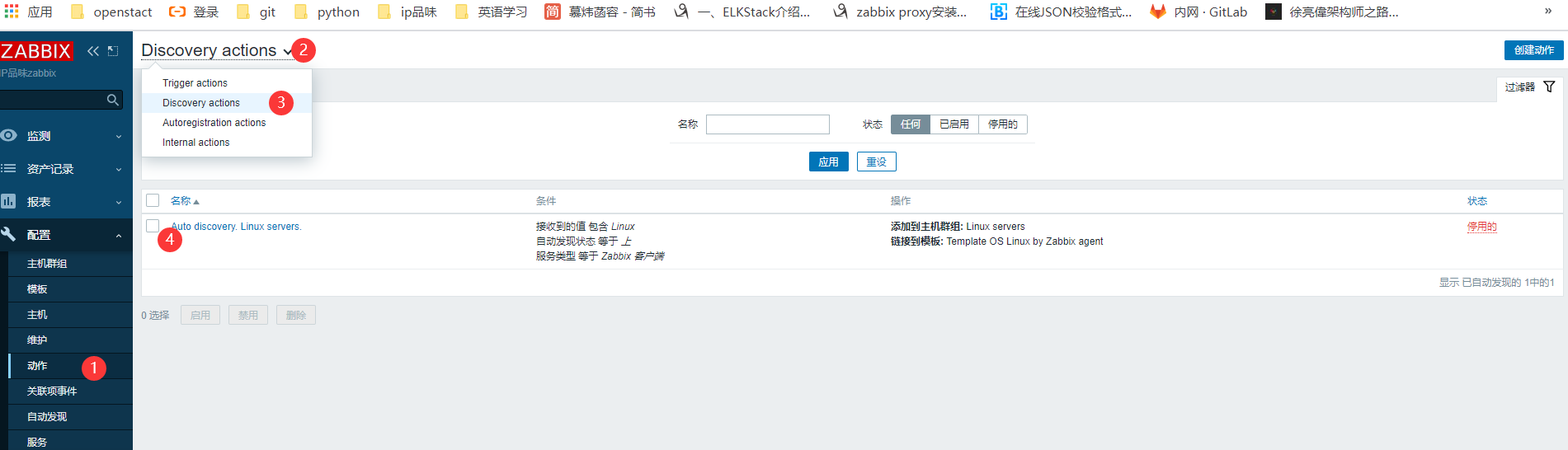
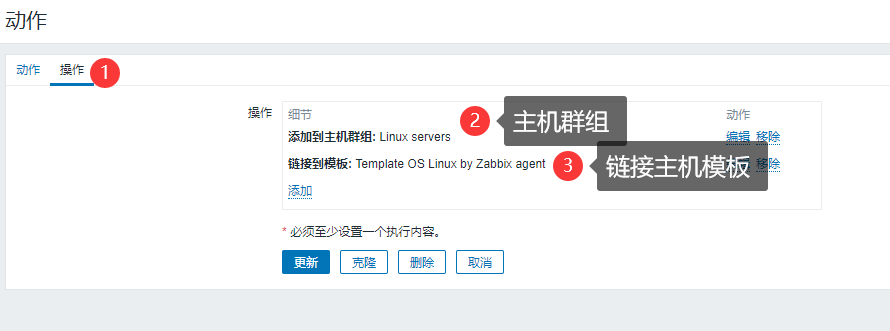
配置動作:注意規則
條件:接收到的值 包含 Linux
自動發現狀態 等於 上
服務類型 等於 Zabbix 客戶端 #必須安裝agent
```

安裝被監控主機,配置被監控主機
```bash
rpm -ivh https://mirror.tuna.tsinghua.edu.cn/zabbix/zabbix/5.0/rhel/7/x86_64/zabbix-agent2-5.0.5-1.el7.x86_64.rpm
vim /etc/zabbix/zabbix_agent2.conf
Server=10.0.0.71 #配置zabbix-server主機IP地址
systemctl start zabbix-agent2.service
systemctl enable zabbix-agent2.service
自動注冊(主動模式)
#主動注冊注意配置被監控端配置
Server=允許取值的IP地址
ServerActive= 主動找server IP地址
Hostname= 被監控主機的主機名或者直接填寫IP地址
HostMetadata= web|DB|cache  根據主機用途作為標識,例如有web主機鏈接Nginx模板,db鏈接數據庫(mysql)模板
自動注冊的規則server端,配置自動注冊的規則。
HostMetadata=


配置操作


17: zabbix-agent主動和被動的區別
18: zabbix版本升級
19: zabbix分布式監控proxy


#安裝zabbix
wget https://mirror.tuna.tsinghua.edu.cn/zabbix/zabbix/5.0/rhel/7/x86_64/zabbix-release-5.0-1.el7.noarch.rpm
rpm -ivh zabbix-release-5.0-1.el7.noarch.rpm
cd /etc/yum.repos.d/
curl -o /etc/yum.repos.d/CentOS-Base.repo http://mirrors.aliyun.com/repo/Centos-7.repo

mysql_secure_installation
mysql
MariaDB [(none)]> create database zabbix character set utf8 collate utf8_bin;
Query OK, 1 row affected (0.00 sec)
MariaDB [(none)]> grant all privileges on zabbix.* to 'zabbix'@'localhost' identified by '123456';
Query OK, 0 rows affected (0.00 sec)
#被監控主機
rpm -ivh https://mirror.tuna.tsinghua.edu.cn/zabbix/zabbix/5.0/rhel/7/x86_64/zabbix-agent2-5.0.5-1.el7.x86_64.rpm
vim /etc/zabbix/zabbix_agent2.conf
Server=10.0.0.71  #配置zabbix-server主機IP地址
systemctl start zabbix-agent2.service
systemctl enable zabbix-agent2.service