
界面客戶端
使用手冊
https://www.jetbrains.com/help/idea/testing-restful-web-services.html
打開方式
Tools -> HTTP Client -> Test RESTful Web Service

文本客戶端
使用手冊 https://www.jetbrains.com/help/idea/http-client-in-product-code-editor.html
特點
- 純文本編寫
- 支持統一配置
- 支持 scripts 腳本
創建新的請求文件
- Scratch files (全局文件)
- physical files(項目文件)

live templates

支持 HTTP 1.1 所有方法
POST、GET、PUT、DELETE、HEAD、OPTIONS、TRACE、CONNECT
### GET ``` ### Get request with a header GET https://httpbin.org/ip Accept: application/json
Get request with parameter
GET https://httpbin.org/get?show_env=1
Accept: application/json
Get request with environment variables
GET {{host}}/get?show_env={{show_env}}
Accept: application/json
Get request with disabled redirects
@no-redirect
GET http://httpbin.org/status/301
<br/><br/>
### POST
Send POST request with json body
POST https://httpbin.org/post
Content-Type: application/json
{
"id": 999,
"value": "content"
}
Send POST request with body as parameters
POST https://httpbin.org/post
Content-Type: application/x-www-form-urlencoded
id=999&value=content
Send a form with the text and file fields
POST https://httpbin.org/post
Content-Type: multipart/form-data; boundary=WebAppBoundary
--WebAppBoundary
Content-Disposition: form-data; name="element-name"
Content-Type: text/plain
Name
--WebAppBoundary
Content-Disposition: form-data; name="data"; filename="data.json"
Content-Type: application/json
< ./request-form-data.json
--WebAppBoundary--
<br/><br/>
### Post請求的兩種編碼格式
<br/>
* application/x-www-form-urlencoded
post的默認格式,使用js中URLencode轉碼方法。
包括將name、value中的空格替換為加號;將非ascii字符做百分號編碼;將input的name、value用‘=’連接,不同的input之間用‘&’連接。
跟get的區別在於,get把轉換、拼接完的字符串用‘?’直接與表單的action連接作為URL使用,所以請求體里沒有數據
* multipart/form-data
將表單中的每個input轉為了一個由boundary分割的小格式,沒有轉碼,直接將utf8字節拼接到請求體中,在本地有多少字節實際就發送多少字節,極大提高了效率,適合傳輸長字節
<br/><br/><br/>
## 查看請求歷史
點擊右上角的按鈕
Show HTTP Requests History
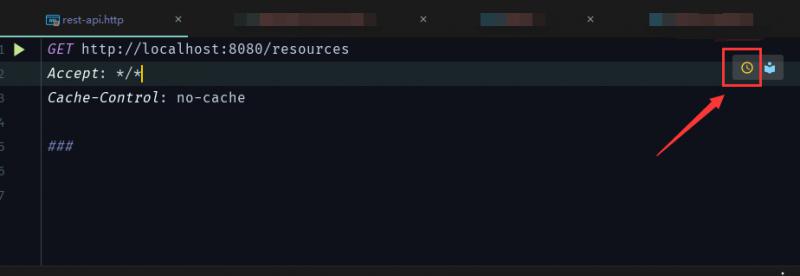
或者在工具欄內打開Tools | HTTP Client | Show HTTP Requests History
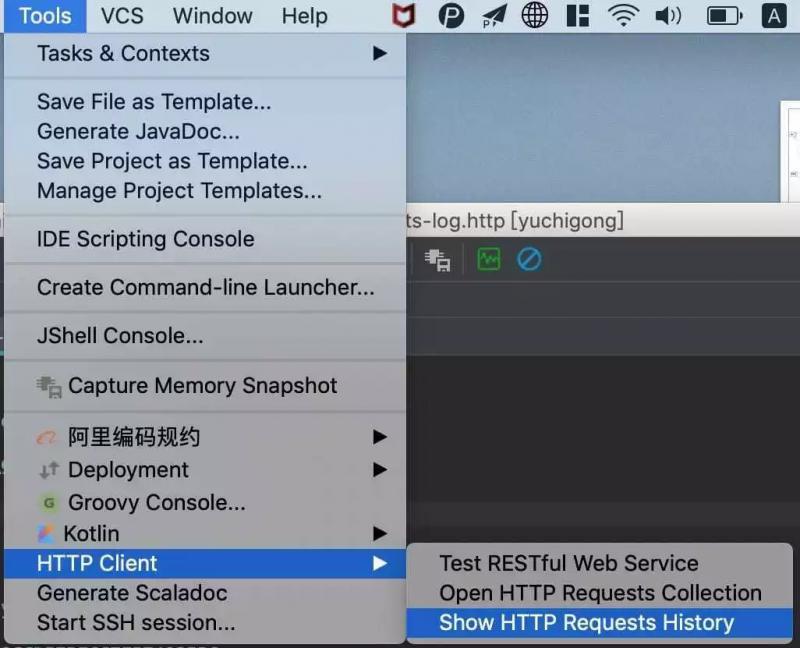
<br/><br/><br/><br/>
## 演示接口重構 - 統一配置
<br/><br/>
### 定義環境變量
環境變量需要定義在環境文件中,環境文件有兩種:
1. 創建名為 rest-client.env.json 或者 http-client.env.json 的環境文件(其實里面就是保存 JSON 數據),該文件里可以定義用在整個項目上的所有常規變量
2. 創建名為rest-client.private.env.json 或者 http-client.private.env.json, 看文件名你應該也猜到這是保存敏感數據的,比如密碼,token等,該文件默認是被加入到 VCS 的 ignore文件中的,同時優先級高於其他環境文件, 也就是說,該文件的變量會覆蓋其他環境文件中的變量值
{
"dev": {
"host": "localhost",
"port": 8081,
"identifier": "tanrgyb",
"password": "iloveu"
},
"prod": {
"host": "dayarch.top",
"port": 8080,
"identifier": "admin",
"password": "admin"
}
}
<br/><br/>
### 通用配置,域名/端口
rest-client.env.json 或 http-client.env.json
{
"default": {
},
"local": {
"host": "http://localhost:8080"
}
}
<br/><br/>
### 個人安全配置,用戶名/密碼
rest-client.private.env.json 或 http-client.private.env.json
{
"default": {
},
"local": {
"account": "admin",
"password": "123456"
}
}
<br/><br/>
### 重構后的請求文件
登陸
POST {{host}}/api/login
Content-Type: application/x-www-form-urlencoded
account=lee&password=123456
測試接口
GET {{host}}/api/security/test
Accept: application/json
Cookie: JSESSIONID=1C1DD3EB60DEE60664FB0BFE0F1C9942
<br/><br/>
運行請求,點擊運行按鈕,可以選擇對應的環境


## 使用 response handler scripts
<br/><br/>
### 引用方式
<br/>
* 直接引用
GET host/api/test
{%
// Response Handler Script
...
%}
<br/><br/>

* 文件引用
GET host/api/test
scripts/my-script.js
<br/><br/><br/>

### 主要方法
<br/><br/>
HTTP Response handling API reference

**client**

* client.global
set(varName, varValue) // 設置全局變量
get(varName) // 獲取全局變量
isEmpty // 檢查 global 是否為空
clear(varName) // 刪除變量
clearAll // 刪除所有變量
* client.test(testName, func) // 創建一個名稱為 testName 的測試
* client.assert(condition, message) // 校驗條件 condition 是否成立,否則拋出異常 message
* client.log(text) // 打印日志
<br/><br/>

**response**

* response.body // 字符串 或 JSON (如果content-type 為 application/json.)
* response.headers
valueOf(headerName) // 返回第一個匹配 headerName 的值,如果沒有匹配的返回 null
valuesOf(headerName) // 返回所有匹配 headerName 的值的數組,如果沒有匹配的返回空數組
* response.status // Http 狀態碼,如: 200 / 400
* response.contentType
mimeType // 返回 MIME 類型,如:text/plain, text/xml, application/json.
charset // 返回編碼 UTF-8 等
<br/><br/><br/>

### 方法調用示例
GET https://httpbin.org/status/200
{%
client.test("Request executed successfully", function() {
client.assert(response.status === 200, "Response status is not 200");
});
%}
<br/><br/>

### 演示接口重構 - 動態更新 Cookie
登陸
POST {{host}}/api/login
Content-Type: application/x-www-form-urlencoded
account={{account}}&password={{password}}
{% client.global.set("Set-Cookie", response.headers.valueOf("Set-Cookie")) %}
測試接口
GET {{host}}/api/security/test
Accept: application/json
Cookie: {{Set-Cookie}}
<br/><br/>
# RestfulToolkit
RestfulToolkit 同樣是個插件,在插件市場搜索安裝即可
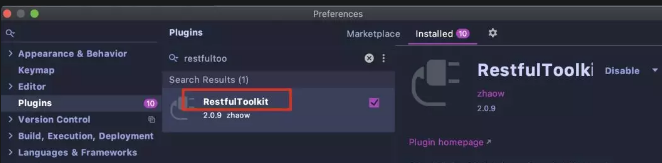
安裝了這個插件后,打開側邊欄,項目的所有接口信息都會展現在此處:
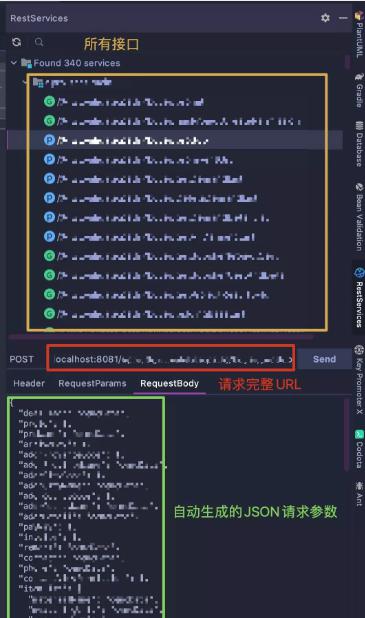
我常用的功能就是把指定接口生成的JSON數據拷貝到 HTTP request 文件中,免去手寫的麻煩了,你說方便不?
除此之外,使用快捷鍵 cmd+\, 可以根據關鍵字快速找到接口,回車迅速到達代碼接口位置,這也是帶來了極大的便利

<br/><br/><br/>
參考:<br/>
https://www.jetbrains.com/help/idea/testing-restful-web-services.html
https://github.com/corningsun/yuchigong/blob/httpClient/httpClient/README.md
https://mp.weixin.qq.com/s/bTej94CNhzzbeN0Cynt4MA