安裝
yum install https://download.postgresql.org/pub/repos/yum/10/redhat/rhel-7-x86_64/pgdg-centos10-10-1.noarch.rpm
yum install epel-release
yum install postgresql10
yum install postgresql10-server
yum install postgis24_10
配置
/usr/pgsql-10/bin/postgresql-10-setup initdb
vim /var/lib/pgsql/10/data/pg_hba.conf
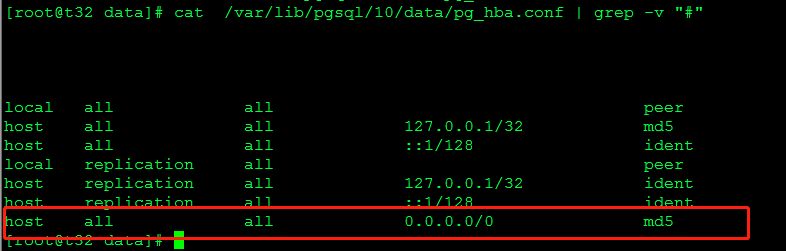
vim /var/lib/pgsql/10/data/postgresql.conf

list_addresses ='*';
port=5432;
max_connections=1000;
max_worker_processes=8;
max_parallel_workers_per_gather=8;
數據庫操作
創建數據庫
postgres:create database gv_place encoding = "UTF-8";
查詢表GFGX_Y_DMK_DMSJ的關鍵字,屬性,是否為空
postgres:SELECT col_description(a.attrelid,a.attnum) as comment,format_type(a.atttypid,a.atttypmod) as type,a.attname as name, a.attnotnull as notnull FROM pg_class as c,pg_attribute as a where c.relname = 'GFGX_Y_DMK_DMSJ' and a.attrelid = c.oid and a.attnum>0
導入tar數據
shell:pg_restore -h 192.168.4.32 -p 5432 -U postgres -d gv_place -v /home/zhangjx/placeName0118.tar
導出tar數據
數據導出到sql
pg_dump -h localhost -U postgres gv_geodata -t image_meta_tmp > image_meta_tmp.sql
從sql導出
psql -h 192.168.4.32 -U postgres -d postgres -f image_meta_tmp.sql
st_astext函數
SELECT *,st_astext("WZ") FROM "GFGX_Y_DMK_DMSJ" WHERE "DMMC" = '萬山群島' ORDER BY "DLBM" LIMIT 10
ST_AsGeoJSON - 將幾何體作為GeoJSON元素返回。
查看postgis版本信息
select postgis_full_version();
刪除數據庫
REVOKE CONNECT ON DATABASE gv_place  FROM public;
SELECT pg_terminate_backend(pg_stat_activity.pid) FROM pg_stat_activity WHERE datname='gv_place' AND pid<>pg_backend_pid();
drop database gv_place;
