xpath定位
被測試網頁的HMTL代碼
[ ](javascript:void(0)😉
<html>
    <body>
        <div id="div1">
            <input name="div1input"></input>
                <a href="http://www.sogou.com">搜狗搜索</a>
                    <img alt="div1-img1" src="http://www.sogou.com/images/logo/new/sogou.png" href="http://www.sogou.com">搜狗圖片</img>
            <input type="button" value="查詢"></>
        </div>
        <br>
        <div name="div2">
            <input name="div2input"></input>
                <a href="http://www.baidu.com">百度搜索</a>
                    <img alt="div2-img2" src="http://www.baidu.com/img/bdlogo.png" href="http://www.baidu.com">百度圖片</img>
        </div>
    </body>
</html>
[](javascript:void(0)😉
絕對路徑定位方式:
在被測試網頁中,查找第一個 div 標簽中的按鈕。
XPath的表達式: /html/body/div/input[@value="查詢"]
Java的定位語句: WebElement button= driver.findElement(By.xpath("/html/body/div/input[@value='查詢']"));
相對路徑定位方式:
在被測試網頁中,查找第一個 div 標簽中的按鈕。
XPath的表達式:
// input[@value="查詢"]
Java的定位語句:
WebElement button= driver.findElement(By.xpath("//input[@value='查詢']"));
XPath 使用索引號定位:
被測試網頁的HMTL代碼
使用索引號定位方式: 在被測試網頁中,查找第二個 div 標簽中的“查詢”按鈕。
XPath的表達式: //input[2]
Java的定位語句: WebElement button= driver.findElement(By.xpath("//input[2]"));
XPath 使用頁面元素的屬性值定位:
使用頁面屬性值方式:
我們嘗試定位被測試網頁中的第一個圖片元素。
XPath 的表達式
//img[@alt='div1-img1']
Java的定位語句:
WebElement img= driver.findElement(By.xpath("//img[@alt='div1-img1']"));
XPath 使用頁面元素的屬性值定位:
| 預期定位的頁面元素 | 定位表達式示例 | 使用的屬性值 |
|---|---|---|
| 定位頁面的第一個圖片 | //img[@href='http://www.sogou.com'] | 使用img標簽的href屬性值 |
| 定位第二個div中第一個Input輸入框 | //div[@name='div2']/input[@name='div2input'] | 使用div標簽的name屬性值 使用 input標簽的name 屬性值 |
| 定位第一個div中的第一個鏈接 | //div[@id='div1']/a[@href='http://www.sogou.com'] | 使用的div標簽的id 屬性值 使用了a標簽的href屬性值 |
| 定位頁面的查詢按鈕 | //input[@type='button'] | 使用了type屬性值 |
XPath 使用模糊頁面屬性值定位:
| XPath函數 | 定位表達式示例 | 表達式解釋 |
|---|---|---|
| Starts-with() | //img[starts-with(@alt,'div1')] | 查找圖片alt屬性開始位置包含’div1’關鍵字的頁面元素 |
| Contains() | //img[contains(@alt,'g1')] | 查找圖片alt屬性包含’g1’關鍵字的頁面元素 |
使用 XPath 的軸(axis)進行元素定位:
軸:
XPath軸(XPath Axes)可定義某個相對於當前節點的節點集:
1、child 選取當前節點的所有子元素
2、parent 選取當前節點的父節點
3、descendant 選取當前節點的所有后代元素(子、孫等)
4、ancestor 選取當前節點的所有先輩(父、祖父等)
5、descendant-or-self 選取當前節點的所有后代元素(子、孫等)以及當前節點本身
6、ancestor-or-self 選取當前節點的所有先輩(父、祖父等)以及當前節點本身
7、preceding-sibling 選取當前節點的開始標簽之前的所有同級節點
8、following-sibling 選取當前節點的結束標簽之后的所有同級節點
9、preceding 選取文檔中當前節點的開始標簽之前的所有節點
10、following 選取文檔中當前節點的結束標簽之后的所有節點
11、self 選取當前節點
12、attribute 選取當前節點的所有屬性
13、namespace 選取當前節點的所有命名空間節點

| XPath軸關鍵字 | 軸的含義說明 | 定位表達式示例 | 表達式解釋 |
| ancestor | 選擇當前節點上層的所有節點 | //img[@alt='div2-img2']/ancestor::div | 查找到alt屬性值為div2-img的圖片,並基於圖片位置找到他上級的div頁面元素 |
| descendant | 選擇當前節點下層的所有節點注:不能超出當前節點的結束標簽 | //div[@name='div2']/descendant::img | 查找到name屬性值的div頁面元素,並基於div的位置找到他下級所有節點中的img頁面元素 |
| following | 選取當前節點的結束標簽之后的所有節點注:仔細體會與descendant的區別 | //div[@id='div1']/following::img | 超找到id 屬性值為div1的div頁面元素,並基於div的位置找到它后面(結束標簽之后)節點中的img頁面元素 |
| following-sibling | 選取當前節點的結束標簽之后的所有平級節點 ,自上而下,離當前結點最近的為索引1,越往下數字越大。 | //a[@href='http://www.sogou.com']/follo wing-sibling::input | 查找到鏈接地址為http://www.sogou.com的鏈接頁面元素,並基於鏈接的位置找到它后續節點中input頁面元素 |
| preceding | 選擇當前節點開始標簽之前的所有節點 | //img[@alt='div2-img2']/preceding::div | 查找到alt屬性值為div2-img2的圖片頁面元素,並基於圖片的位置找到它前面節點中的div頁面元素 |
| preceding-sibling | 選擇當前節點開始標簽之前的所有同級節點,自下而上,離當前結點最近的為索引1,越往上數字越大。 | //img[@alt='div2-img2']/preceding-sibling ::a[1] | 查找到alt屬性值為div2-img2的圖片頁面元素,並基於圖片的位置找到它前面同級節點中的第二個鏈接頁面元素 |
例子:
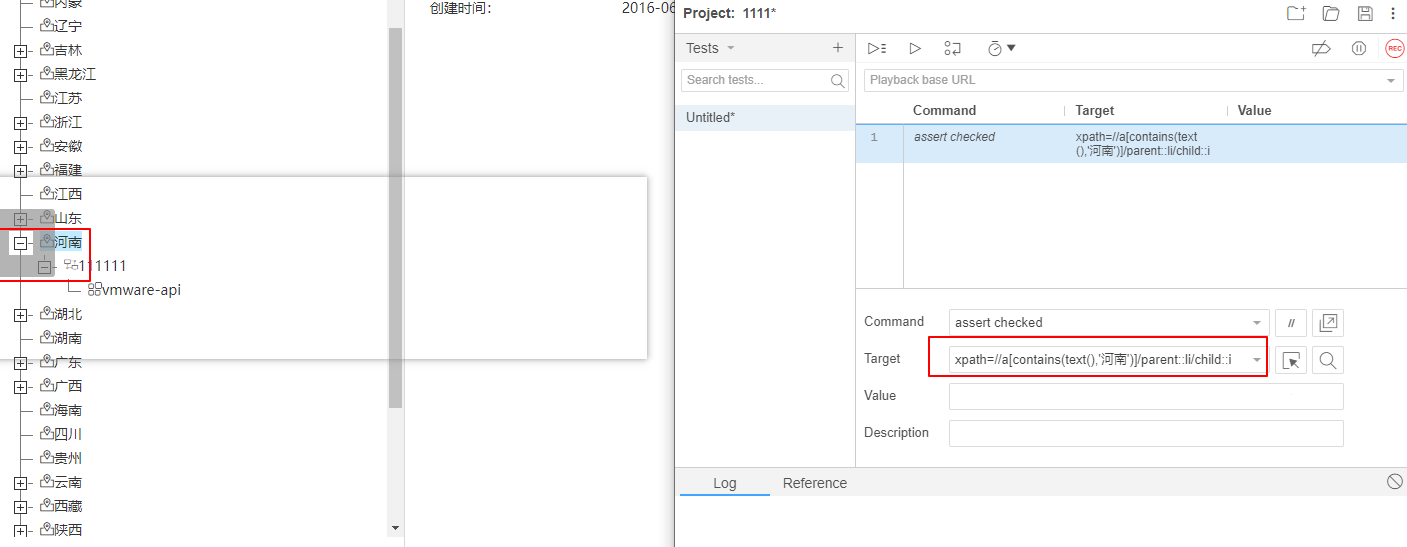
如下,需要根據下圖中的“河南”關鍵字,定位到前面的操作按鈕,:
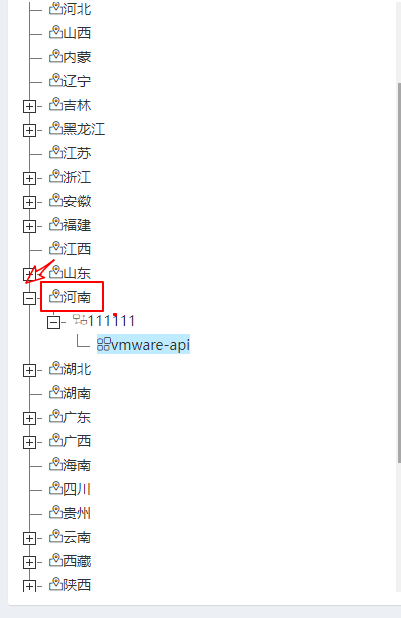
查看html代碼,結構如下

1)先找到河南的元素位置
xpath=//a[contains(text(),'河南')]
2)根據dom結構,相對定位
xpath=//a[contains(text(),'河南')]/parent::li/child::i