
一、服務發現架構
服務發現架構通常具有下面 4 個概念:
- 服務注冊:服務如何使用服務發現代理進行注冊?
- 服務地址的客戶端查找:服務客戶端查找服務信息的方法是什么?
- 信息共享:如何跨節點共享服務信息?
- 健康監測:服務如何將它的健康信息傳回給服務發現代理?
下圖展示了這 4 個概念的流程,以及在服務發現模式實現中通常發生的情況:
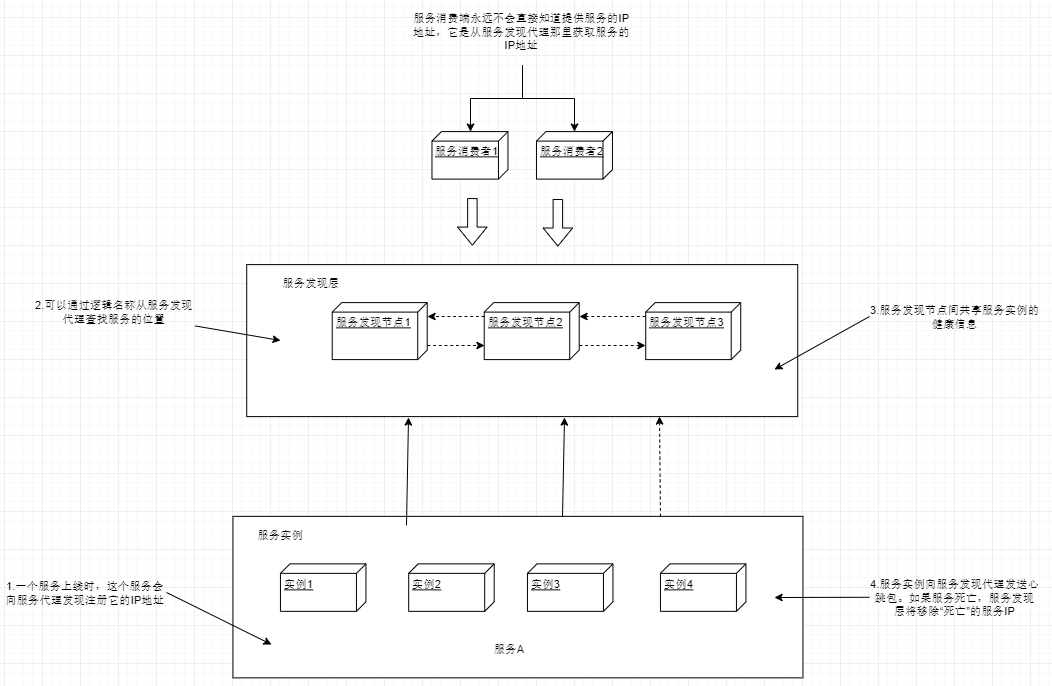
通常服務實例都只向一個服務發現實例注冊,服務發現實例之間再通過數據傳輸,讓每個服務實例注冊到所有的服務發現實例中。
服務在向服務發現實例注冊后,這個服務就能被服務消費者調用了。服務消費者可以使用多種模型來"發現"服務。
- 每次調用服務時,通過服務發現層來獲取目標服務地址並進行調用。這種用的比較少,弊端較多。首先是每次服務調用都通過服務發現層來完成,耗時會比直接調用高。最主要的是這種方法很脆弱,消費端完全依賴於服務發現層來查找和調用服務。
- 更健壯的方法是使用所謂的客戶端負載均衡。
如下圖所示:
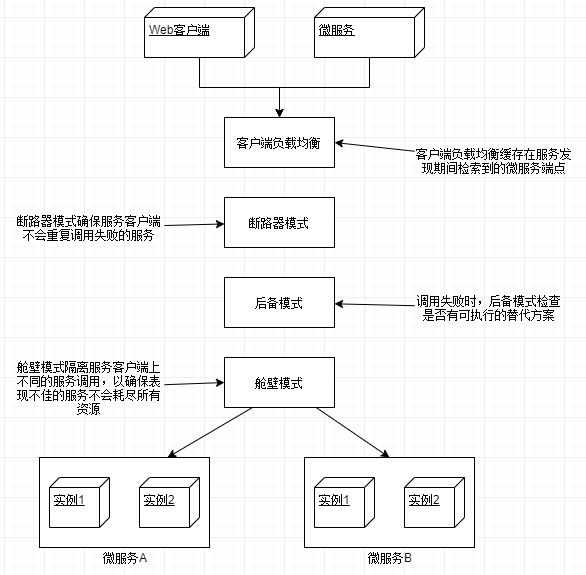
在這個模型中,當服務消費者需要調用一個服務時:
(1)聯系服務發現層,獲取所請求服務的所有服務實例,然后放到本地緩存中。
(2)每次調用該服務時,服務消費者從緩存中取出一個服務實例的位置,通常這個'取出'使用簡單的復制均衡算法,如“輪詢”,“隨機",以確保服務調用分布在所有實例之間。
(3)客戶端將定期與服務發現層進行通信,並刷新服務實例的緩存。
(4)如果在調用服務的過程中,服務調用失敗,那么本地緩存將從服務發現層中刷新數據,再次嘗試。
二、spring cloud 實戰
使用 spring cloud 和 Netflix Eureka 搭建服務發現實例。
1、構建 Spring Eureka 服務
eurekasvr POM 主要配置如下:
<!-- 其他依賴省略 -->
<dependency>
    <groupId>org.springframework.cloud</groupId>
    <artifactId>spring-cloud-starter-eureka-server</artifactId>
</dependency>
applicaiton.yml 配置如下:
server:
  port: 8761

eureka:
  client:
    #不注冊自己
    register-with-eureka: false
    #不在本地緩存注冊表信息
    fetch-registry: false
  server:
    #接受請求前的等待實際,開發模式下不要開啟
    #wait-time-in-ms-when-sync-empty: 5
最后在啟動類上加入注釋@SpringBootApplication即可啟動服務中心。服務中心管理頁面:http://localhost:8761
2、將服務注冊到服務中心
這里我們編寫一個新服務注冊到服務中心,organizationservice:組織服務。並將上一篇的兩個服務:confsvr:配置中心服務,licensingservice:授權服務注冊到服務中心。
a、confvr 注冊
首先修改 POM 文件:
<dependency>
    <groupId>org.springframework.cloud</groupId>
    <artifactId>spring-cloud-config-server</artifactId>
</dependency>
<dependency>
    <groupId>org.springframework.cloud</groupId>
    <artifactId>spring-cloud-starter-eureka</artifactId>
</dependency>
然后修改配置文件 application.yml:
server:
  port: 8888

eureka:
  instance:
    #注冊服務的IP,而不是服務器名
    prefer-ip-address: true
  client:
    #向eureka注冊服務
    register-with-eureka: true
    #拉取注冊表的本地副本
    fetch-registry: true
    service-url:
      #Eureka服務的位置(如果有多個注冊中心,使用,分隔)
      defaultZone: http://localhost:8761/eureka/

spring:
  profiles:
    # 使用文件系統來存儲配置信息,需要設置為native
    active: native
  application:
    name: confsvr
  cloud:
    config:
      server:
        native:
          # 使用文件來存放配置文件,為每個應用程序提供用逗號分隔的文件夾列表
          searchLocations: file:///D:/configFolder/licensingservice,file:///D:/configFolder/organizationservice
最后在啟動類加入注解@EnableDiscoveryClient,啟動即可在 eureka 管理頁面發現。
b、licensingservice 注冊
首先修改 POM
<dependency>
    <groupId>org.springframework.cloud</groupId>
    <artifactId>spring-cloud-starter-eureka</artifactId>
</dependency>
<dependency>
    <groupId>org.springframework.cloud</groupId>
    <artifactId>spring-cloud-config-client</artifactId>
</dependency>
然后修改配置文件 bootstrap.yml
spring:
  application:
    #指定名稱,以便spring cloud config客戶端知道查找哪個配置
    name: licensingservice
  profiles:
    #指定環境
    active: dev
  cloud:
    config:
      #設為true便會自動獲取從配置中心獲取配置文件
      enabled: true
eureka:
  instance:
    prefer-ip-address: true
  client:
    register-with-eureka: true
    fetch-registry: true
    service-url:
      defaultZone: http://localhost:8761/eureka/
最后在啟動類加入注解@EnableDiscoveryClient,啟動即可在 eureka 管理頁面發現本服務實例。
c、創建 organizationservice
首先在文件夾file:///D:/configFolder/organizationservice下創建兩個配置文件:organizationservice.yml,organizationservice-dev.yml,內容分別為:
#organizationservice-dev.yml
server:
  port: 10012
#organizationservice.yml
spring:
  application:
    name: organizationservice
主要 POM 配置如下:
<dependency>
    <groupId>org.springframework.cloud</groupId>
    <artifactId>spring-cloud-starter-eureka</artifactId>
</dependency>
<dependency>
    <groupId>org.springframework.cloud</groupId>
    <artifactId>spring-cloud-config-client</artifactId>
</dependency>
然后修改配置文件,bootstrap.yml
spring:
  application:
    #指定名稱,以便spring cloud config客戶端知道查找哪個配置
    name: organizationservice
  profiles:
    #指定環境
    active: dev
  cloud:
    config:
      enabled: true
eureka:
  instance:
    prefer-ip-address: true
  client:
    register-with-eureka: true
    fetch-registry: true
    service-url:
      defaultZone: http://localhost:8761/eureka/
最后在啟動類加入注解@EnableDiscoveryClient,啟動。
3、使用服務發現來查找服務
現在已經有兩個注冊服務了,現在來讓許可證服務調用組織服務,獲取組織信息。首先在 organizationservice 服務中的 controller 包中加入一個 controller 類,讓它能夠響應請求:
//OrganizationController.java
@RestController
public class OrganizationController {

    @GetMapping(value = "/organization/{orgId}")
    public Object getOrganizationInfo(@PathVariable("orgId") String orgId) {
        Map<String, String> data = new HashMap<>(2);
        data.put("id", orgId);
        data.put("name", orgId + "公司");
        return data;
    }
}
接下來讓許可證服務通過 Eureka 來找到組織服務的實際位置,然后調用該接口。為了達成目的,我們將要學習使用 3 個不同的 Spring/Netflix 客戶端庫,服務消費者可以使用它們來和 Ribbon 進行交互。從最低級別到最高級別,這些庫包含了不同的與 Ribbon 進行交互的抽象封裝層次:
- Spring DiscoveryClient
- 啟用了 RestTemplate 的 Spring DiscoveryClient
- Neflix Feign 客戶端
a、使用 Spring DiscoveryClient
該工具提供了對 Ribbon 和 Ribbon 中緩存的注冊服務最低層次的訪問,可以查詢通過 Eureka 注冊的所有服務以及這些服務對應的 URL。
首先在 licensingservice 的啟動類中加入@EnableDiscoveryClient注解來啟用 DiscoveryClient 和 Ribbon 庫。
然后在 service 包下創建 OrganizationService.java
@Service
public class OrganizationService {

    private static final String SERVICE_NAME = "organizationservice";
    private DiscoveryClient discoveryClient;

    @Autowired
    public OrganizationService(DiscoveryClient discoveryClient) {
        this.discoveryClient = discoveryClient;
    }

    /**
     * 使用Spring DiscoveryClient查詢
     *
     * @param id
     * @return
     */
    public Organization getOrganization(String id) {
        RestTemplate restTemplate = new RestTemplate();
        List<ServiceInstance> instances = discoveryClient.getInstances(SERVICE_NAME);
        if (instances.size() == 0) {
            throw new RuntimeException("無可用的服務");
        }
        String serviceUri = String.format("%s/organization/%s", instances.get(0).getUri().toString(), id);
        ResponseEntity<Organization> responseEntity = restTemplate.exchange(serviceUri, HttpMethod.GET
                , null, Organization.class, id);
        return responseEntity.getBody();
    }
}
接着在 controller 包中新建 LicensingController.java
@RestController
public class LicensingController {

    private OrganizationService organizationService;

    @Autowired
    public LicensingController(OrganizationService organizationService) {
        this.organizationService = organizationService;
    }

    @GetMapping("/licensing/{orgId}")
    public Licensing getLicensing(@PathVariable("orgId") String orgId) {
        Licensing licensing = new Licensing();
        licensing.setValid(false);
        licensing.setOrganization(organizationService.getOrganization(orgId));
        return licensing;
    }
}
啟動所有項目,訪問localhost:10011/licensing/12,可以看到返回如下結果:
{
  "organization": {
    "id": "12",
    "name": "12公司"
  },
  "valid": false
}
在實際開發中,基本上是用不到這個的,除非是為了查詢 Ribbon 以獲取某個服務的所有實例信息,才會直接使用。如果直接使用它存在以下兩個問題:
- 沒有利用 Ribbon 的客戶端負載均衡
- 和業務無關的代碼寫得太多
b、使用帶 Ribbon 功能的 Spring RestTemplate 調用服務
這種方法是較為常用的微服務通信機制之一。要啟動該功能,需要使用 Spring Cloud 注解@LoadBanced 來定義 RestTemplate bean 的構造方法。方便起見直接在啟動類中定義 bean:
#LicensingserviceApplication.java
@SpringBootApplication
@EnableDiscoveryClient  //使用不帶Ribbon功能的Spring RestTemplate,其他情況下可刪除
public class LicensingserviceApplication {

    /**
     * 使用帶有Ribbon 功能的Spring RestTemplate,其他情況可刪除
     */
    @LoadBalanced
    @Bean
    public RestTemplate getRestTemplate(){
        return new RestTemplate();
    }

    public static void main(String[] args) {
        SpringApplication.run(LicensingserviceApplication.class, args);
    }
}
接着 service 包下增加一個類:OrganizationByRibbonService.java
@Component
public class OrganizationByRibbonService {

    private RestTemplate restTemplate;

    @Autowired
    public OrganizationByRibbonService(RestTemplate restTemplate) {
        this.restTemplate = restTemplate;
    }

    public Organization getOrganizationWithRibbon(String id) {
        ResponseEntity<Organization> responseEntity = restTemplate.exchange("http://organizationservice/organization/{id}",
                HttpMethod.GET, null, Organization.class, id);
        return responseEntity.getBody();
    }
}
最后就是在 LicensingController.js 中加一個訪問路徑:
//不要忘記注入OrganizationByRibbonService服務
@GetMapping("/licensingByRibbon/{orgId}")
    public Licensing getLicensingByRibbon(@PathVariable("orgId") String orgId) {
        Licensing licensing = new Licensing();
        licensing.setValid(false);
        licensing.setOrganization(organizationService.getOrganization(orgId));
        return licensing;
    }
}
訪問localhost:10011/licensingByRibbon/113,即可看到結果。
c、使用 Netflix Feign 客戶端調用
Feign 客戶端是 Spring 啟用 Ribbon 的 RestTemplate 類的替代方案。開發人員只需定義一個接口,然后使用 Spring 注解來標注接口,即可調用目標服務。除了編寫接口定義無需編寫其他輔助代碼。
首先啟動類上加一個@EnableFeignClients注解啟用 feign 客戶端。然后在 POM 中加入 Feign 的依賴
<dependency>
  <groupId>org.springframework.cloud</groupId>
  <artifactId>spring-cloud-starter-feign</artifactId>
</dependency>
然后在 client 包下新建 OrganizationFeignClient.java
@FeignClient("organizationservice")//使用FeignClient注解指定目標服務
public interface OrganizationFeignClient {

    /**
     * 獲取組織信息
     *
     * @param orgId 組織id
     * @return Organization
     */
    @RequestMapping(method = RequestMethod.GET, value = "/organization/{orgId}", consumes = "application/json")
    Organization getOrganization(@PathVariable("orgId") String orgId);
}
最后修改LicensingController.java,加入一個路由調用 Feign。
//注入OrganizationFeignClient,使用構造注入

@GetMapping("/licensingByFeign/{orgId}")
public Licensing getLicensingByFeign(@PathVariable("orgId") String orgId) {
    Licensing licensing = new Licensing();
    licensing.setValid(false);
    licensing.setOrganization(organizationFeignClient.getOrganization(orgId));
    return licensing;
}
訪問localhost:10011/licensingByFeign/11313,即可看到結果。
總結
這一節磨磨蹭蹭寫了好幾天,雖然例子很簡單,但是相信應該是能夠看懂的。由於篇幅原因代碼沒有全部貼上,想要查看完整代碼,可以訪問這個鏈接:點擊跳轉。