
一、環境准備:
- ELK stack 環境一套
- geolite數據庫文件
二、下載geolite數據庫(logstash機器上解壓,logstash需調用):
geolite官網:https://dev.maxmind.com
[root@localhost local]# tar xf GeoLite2-City_20181211.tar.gz
[root@localhost local]# ll GeoLite2-City_20181211
total 60604
-rw-r--r-- 1 es es       55 Dec 13 03:56 COPYRIGHT.txt
-rw-r--r-- 1 es es 62044006 Dec 13 03:56 GeoLite2-City.mmdb  //數據庫文件,logstash配置文件中直接引用即可
-rw-r--r-- 1 es es      433 Dec 13 03:56 LICENSE.txt
-rw-r--r-- 1 es es      116 Dec 13 03:56 README.txt
三、編輯logstash配置文件
[root@localhost logstash]# cat conf.d/logstash-sample.conf
input {
  beats {
    port => 5044
  }
}

filter {
  grok {
    match => {
      patterns_dir => ["/usr/local/logstash/patterns"]
      "message" => "%{COMMONNGINXLOG}"
    }
    overwrite => "message"
  }
  geoip {
    source => "clientip"
    target => "geoip"
    database => "/usr/local/GeoLite2-City_20181211/GeoLite2-City.mmdb"
    add_field => ["[geoip][coordinates]", "%{[geoip][longitude]}" ]
    add_field => ["[geoip][coordinates]", "%{[geoip][latitude]}"  ]
  }
  mutate {
    convert => [ "[request_time]","float" ]
  }
}


output {
  elasticsearch {
    hosts => ["http://192.168.20.4:9200"]
    index => "logstash-kibana_nginx"   //這里之前還有一個logstash_kibana_nginx。注意這里是_與-的區別。
  }
}
配置解釋
- geoip:IP查詢插件,默認安裝
- source: 需要通過geoip插件處理的filed,根據實際情況中nginx日志ip的field_name來修改。
- target: 解析后的geoip地址數據,存放在定義的字段中,默認geoip這個字段
- database: 指定下載的數據庫文件
- add_field: 添加經緯度,地圖的定位顯示是依靠經緯度來實別的
四、展示
打開kibana訪問界面:

上圖elasticsearch中存儲了兩個index

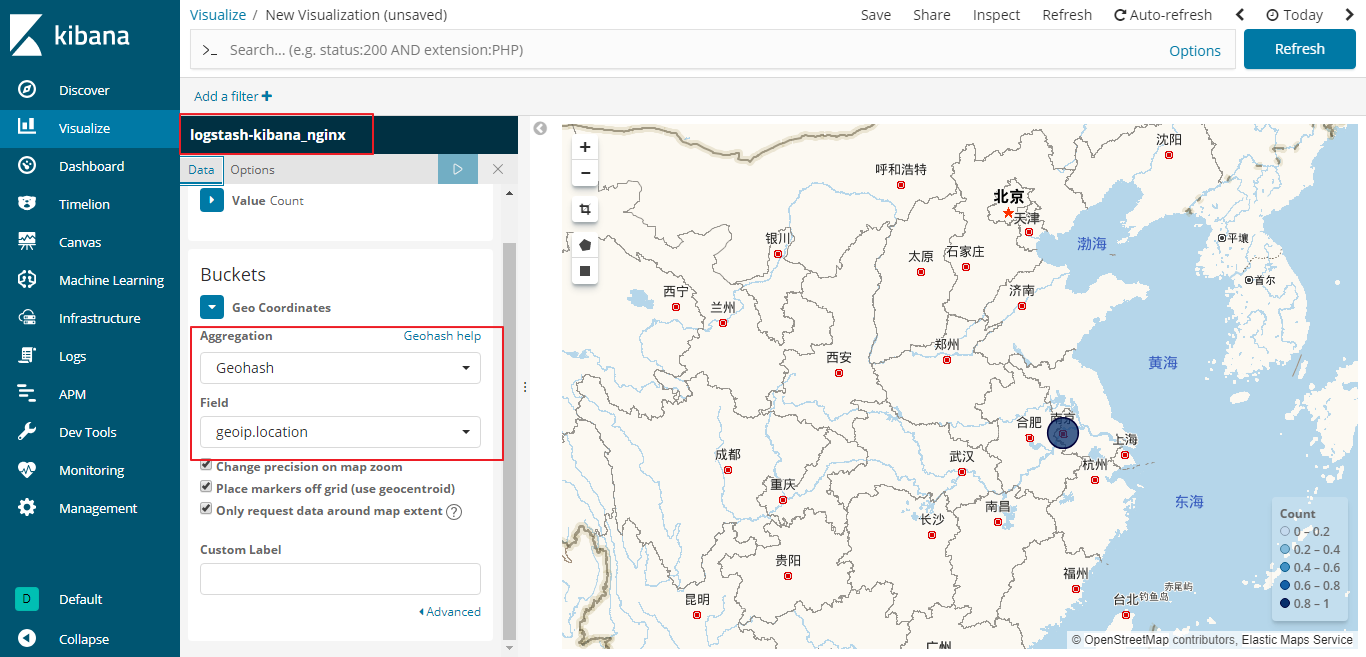
如上圖,使用logstash_kibana_nginx索引添加地圖展示時,無法選擇相應field,並提示No Compatible Fields: The "logstash_kibana_nginx" index pattern does not contain any of the following field types: geo_point。提示沒有相應"geo_point"類型,可是我的配置文件中根本就沒有定義相應類型的啊!那只可能是程序自帶的問題了。正好我又上網查閱別人的教程中發現似乎只有index不一致,於是便照着修改了一個一模一樣的配置把index修改成logstash-kibana_nginx。等幾秒logstash自動reload后,如下圖就可以選擇展示了:
參考博客地址:https://www.jianshu.com/p/07b82092d4af
五、修改kibana默認地圖為國內高德地圖
[root@localhost kibana]# echo "tilemap.url: 'http://webrd02.is.autonavi.com/appmaptile?lang=zh_cn&size=1&scale=1&style=7&x={x}&y={y}&z={z}'" >> config/kibana.yml
添加完成后重啟生效:

Question
為什么得使用logstash-開頭的index可以有geo_point類型?在網上和文檔中一番查找,最后發現logstash默認自帶的template是以template" : "logstash-*。
[root@localhost logstash]# cat vendor/bundle/jruby/2.3.0/gems/logstash-output-elasticsearch-9.2.4-java/lib/logstash/outputs/elasticsearch/elasticsearch-template-es6x.json  //6版本elasticsearch默認上傳模版
{
  "template" : "logstash-*",     //模版名稱,即index名匹配規則
  "version" : 60001,
  "settings" : {
    "index.refresh_interval" : "5s"
  },
  "mappings" : {
    "_default_" : {
      "dynamic_templates" : [ {
        "message_field" : {
          "path_match" : "message",
          "match_mapping_type" : "string",
          "mapping" : {
            "type" : "text",
            "norms" : false
          }
        }
      }, {
        "string_fields" : {
          "match" : "*",
          "match_mapping_type" : "string",
          "mapping" : {
            "type" : "text", "norms" : false,
            "fields" : {
              "keyword" : { "type": "keyword", "ignore_above": 256 }
            }
          }
        }
      } ],
      "properties" : {
        "@timestamp": { "type": "date"},
        "@version": { "type": "keyword"},
        "geoip"  : {
          "dynamic": true,
          "properties" : {
            "ip": { "type": "ip" },
            "location" : { "type" : "geo_point" },
            "latitude" : { "type" : "half_float" },
            "longitude" : { "type" : "half_float" }
          }
        }
      }
    }
  }
}
[root@localhost logstash]#
下一章會專門寫一篇關於template,敬請期待。