
Hello, Welcome to Selenium tutorial in this post we will see how to Handle Untrusted Certificate Selenium.
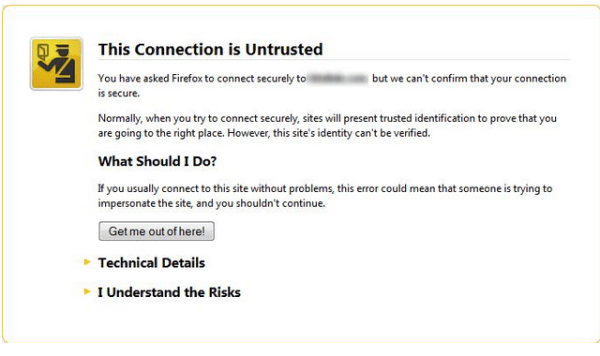
- What is Untrusted SSL certificate? Whenever We try to access HTTPS website or application so many time you will face untrusted SSL certificate issue. This issue comes in all browser like IE,Chrome,Safari, Firefox etc.
2- Why we get this certificate issues often?
This certificates some in multiple conditions and we should know all of them so that we can rectify them easily.
1- Each secure site has Certificate so its certificate is not valid up-to-date.
2– Certificate has been expired on date
3– Certificate is only valid for (site name)
4- The certificate is not trusted because the issuer certificate is unknown due to many reasons.
Handle Untrusted Certificate Selenium
Step 1-We have to create FirefoxProfile in Selenium.
Step 2- We have some predefined method in Selenium called setAcceptUntrustedCertificates() which accept Boolean values(true/false)- so we will make it true.
Step 3-Open Firefox browser with the above-created profile.
I have published video on the same.
Handle untrusted certificate in Firefox
import org.openqa.selenium.WebDriver;
import org.openqa.selenium.firefox.FirefoxDriver;
import org.openqa.selenium.firefox.FirefoxProfile;

public class SSLCertificate {

public static void main(String[] args) {

//It create firefox profile
FirefoxProfile profile=new FirefoxProfile();

// This will set the true value
profile.setAcceptUntrustedCertificates(true);

// This will open  firefox browser using above created profile
WebDriver driver=new FirefoxDriver(profile);

driver.get("pass the url as per your requirement");


}

}
Since Firefox comes default browser in Selenium so for other browsers like Chrome, IE, Safari we have to use below technique.
Handle untrusted certificate in Chrome
// Create object of DesiredCapabilities class
DesiredCapabilities cap=DesiredCapabilities.chrome();

// Set ACCEPT_SSL_CERTS  variable to true
cap.setCapability(CapabilityType.ACCEPT_SSL_CERTS, true);

// Set the driver path
System.setProperty("webdriver.chrome.driver","Chrome driver path");

// Open browser with capability
WebDriver driver=new ChromeDriver(cap);
Handle untrusted certificate in IE


// Create object of DesiredCapabilities class

DesiredCapabilities cap=DesiredCapabilities.internetExplorer();

// Set ACCEPT_SSL_CERTS  variable to true
cap.setCapability(CapabilityType.ACCEPT_SSL_CERTS, true);

// Set the driver path
System.setProperty("webdriver.ie.driver","IE driver path");

// Open browser with capability
WebDriver driver=newInternetExplorerDriver(cap);
Handle untrusted certificate in Safari
// Create object of DesiredCapabilities class

DesiredCapabilities cap=DesiredCapabilities.safari();

// Set ACCEPT_SSL_CERTS  variable to true
cap.setCapability(CapabilityType.ACCEPT_SSL_CERTS, true);

// Set the driver path
System.setProperty("webdriver.safari.driver","Safari driver path");

// Open browser with capability
WebDriver driver=new SafariDriver(cap);
I would suggest you add above code in Base Class in Selenium Webdriver so you don’t have to write code again and again.
I have implemented in my office project and found good results.
Thanks for visiting my blog. Please comment below if you finding any issue.
Keep in touch. Have a nice day 