
Android 5.0 及以上實現方式(android在5.0之后引入Material Design 實現方式相對簡單)
透明狀態欄,背景浸入狀態欄
if (Build.VERSION.SDK_INT >= Build.VERSION_CODES.LOLLIPOP) { Window window = getWindow(); window.addFlags(WindowManager.LayoutParams.FLAG_TRANSLUCENT_STATUS); }在布局文件中View 默認fitsSystemWindows 值為 false 因此會看到整個布局是從最頂端開始的,如果布局頂端有TextView 會看到狀態欄覆蓋了TextView。這種情況下可以針對特定的布局設置
android:fitsSystemWindows="true"哪個view設置了這個屬性為true,系統就會調整該view的padding值來留出空間給系統窗體。表現為,padding出status bar的高度給status bar使用,不至於我們定義layout跟status bar重疊!
着色狀態欄
if (Build.VERSION.SDK_INT >= Build.VERSION_CODES.LOLLIPOP) { Window window = getWindow(); // 有些情況下需要先清除透明flag window.clearFlags(WindowManager.LayoutParams.FLAG_TRANSLUCENT_STATUS); window.addFlags(WindowManager.LayoutParams.FLAG_DRAWS_SYSTEM_BAR_BACKGROUNDS); window.setStatusBarColor(getResources().getColor(R.color.green)); }
//--------------------------------------------------------
Android 狀態欄工具類(實現沉浸式狀態欄/變色狀態欄)
博客源址:http://laobie.github.io/android/2016/03/27/statusbar-util.html
測試結果:
華為榮耀 4A Android版本5.1.1 狀態欄始終無法調節(微信也無法調節狀態欄,是華為系統自己禁止了狀態欄)。
小米4 可以調節。

這是一個為Android App 設置狀態欄的工具類, 可以在4.4及其以上系統中實現 沉浸式狀態欄/狀態欄變色,支持設置狀態欄透明度,滿足你司設計師的各種要求(霧)。
在此之前我寫過一篇Android App 沉浸式狀態欄解決方案,后來我司設計師說默認的透明度太深了,讓我改淺一點,然后在想了一些辦法之后給解決了。本着不重復造輪子的原則,索性整理成一個工具類,方便需要的開發者。
Sample 下載
特性
1. 設置狀態欄顏色
StatusBarUtil.setColor(Activity activity, int color) 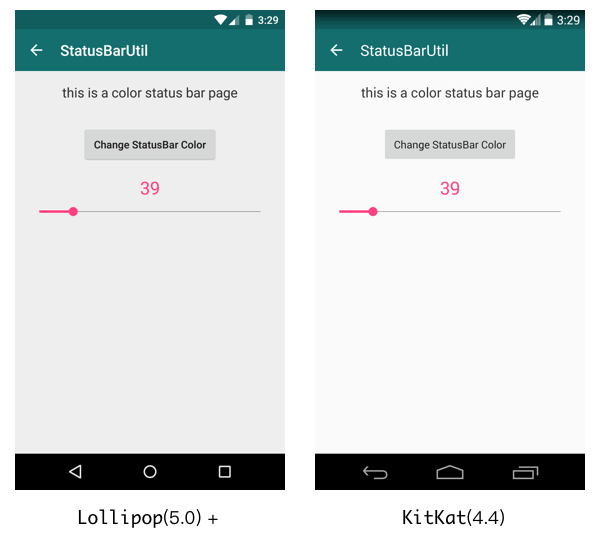
2. 設置狀態欄半透明
StatusBarUtil.setTranslucent(Activity activity, int statusBarAlpha) 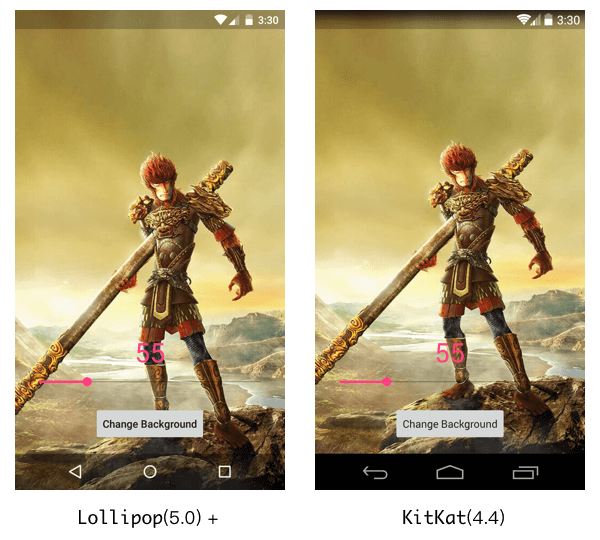
3. 設置狀態欄全透明
StatusBarUtil.setTransparent(Activity activity) 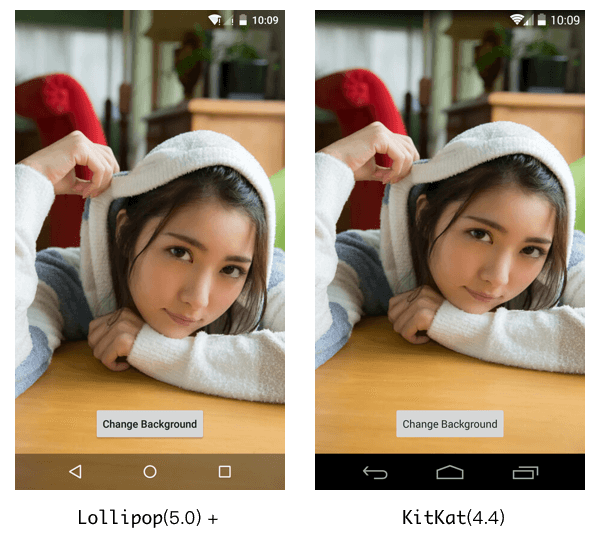
4. 為包含 DrawerLayout 的界面設置狀態欄顏色(也可以設置半透明和全透明)
StatusBarUtil.setColorForDrawerLayout(Activity activity, DrawerLayout drawerLayout, int color) 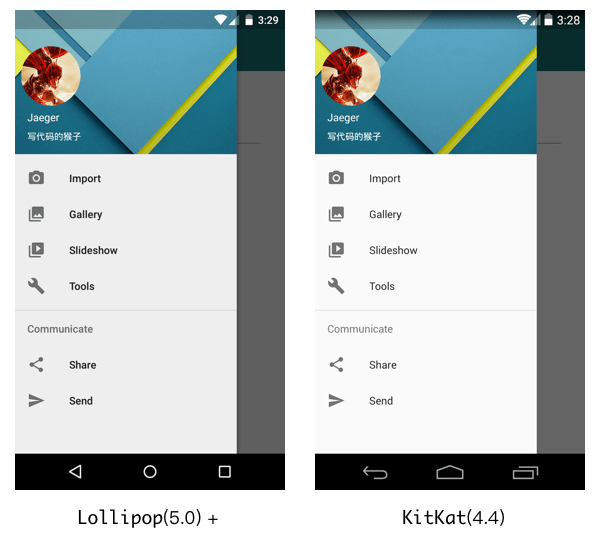
5. 通過傳入 statusBarAlpha 參數,可以改變狀態欄的透明度值,默認值是112。
使用
1. 在 build.gradle 文件中添加依賴, StatusBarUtil 已經發布在 JCenter:
compile 'com.jaeger.statusbaruitl:library:1.0.0' 2. 在 setContentView() 之后調用你需要的方法,例如:
setContentView(R.layout.main_activity); ... StatusBarUtil.setColor(MainActivity.this, mColor); 3. 如果你在一個包含 DrawerLayout 的界面中使用, 你需要在布局文件中為 DrawerLayout 添加android:fitsSystemWindows="true" 屬性:
<android.support.v4.widget.DrawerLayout xmlns:android="http://schemas.android.com/apk/res/android" xmlns:app="http://schemas.android.com/apk/res-auto" android:id="@+id/drawer_layout" android:layout_width="match_parent" android:layout_height="match_parent" android:fitsSystemWindows="true"> ... </android.support.v4.widget.DrawerLayout>