
在上一篇(RecyclerView使用詳解(二))文章中介紹了RecyclerView的多Item布局實現,接下來要來講講RecyclerView的Cursor實現,相較於之前的實現,Cursor有更多的使用場景,也更加的常用,特別是配合LoaderManager和CursorLoader進行數據的緩存及加載顯示,基於此我們來重點看看RecyclerView的CursorAdapter具體要怎么實現。
##一、CursorAdapter實現(配合LoaderManager和CursorLoader)
如果之前你用過ListView實現過此功能(CursorAdapter),那么你一定對下面這兩個方法並不陌生
[代碼]java代碼:
|
1
2
3
4
5
6
7
8
9
|
@Override
public
View newView(Context context, Cursor cursor, ViewGroup parent) {
return
null
;
}
@Override
public
void
bindView(View view, Context context, Cursor cursor) {
}
|
其中newView方法是用來創建Item布局的,bindView 方法是用來綁定當前View數據的,就相當於之前的getView方法拆成了兩個方法實現。
如果你用RecyclerView,你會發現CursorAdapter這個類沒有了,既然沒有了,那我們就自己仿照着ListView的CursorAdapter類來實現,具體的代碼沒什么大的出入,無非就是注冊兩個觀察者去監聽數據庫數據的變化,但是有兩個地方需要注意一下,一個就是hasStableIds() 這個方法RecyclerView.Adapter中不能復寫父類的方法,需要在初始化的時候調用setHasStableIds(true); 來完成相同功能,第二個就是notifyDataSetInvalidated() 這個方法沒有,統一修改成notifyDataSetChanged() 方法即可。
[代碼]java代碼:
|
01
02
03
04
05
06
07
08
09
10
11
12
13
14
15
16
17
18
19
20
21
22
23
24
25
26
27
28
29
30
31
32
33
34
35
36
37
38
39
40
41
42
43
44
45
46
47
48
49
50
51
52
53
54
55
56
57
58
59
60
61
62
63
64
|
void
init(Context context, Cursor c,
int
flags) {
boolean
cursorPresent = c !=
null
;
mCursor = c;
mDataValid = cursorPresent;
mContext = context;
mRowIDColumn = cursorPresent ? c.getColumnIndexOrThrow(
"_id"
) : -
1
;
if
((flags & FLAG_REGISTER_CONTENT_OBSERVER) == FLAG_REGISTER_CONTENT_OBSERVER) {
mChangeObserver =
new
ChangeObserver();
mDataSetObserver =
new
MyDataSetObserver();
}
else
{
mChangeObserver =
null
;
mDataSetObserver =
null
;
}
if
(cursorPresent) {
if
(mChangeObserver !=
null
) c.registerContentObserver(mChangeObserver);
if
(mDataSetObserver !=
null
) c.registerDataSetObserver(mDataSetObserver);
}
setHasStableIds(
true
);
//這個地方要注意一下,需要將表關聯ID設置為true
}
//************//
public
Cursor swapCursor(Cursor newCursor) {
if
(newCursor == mCursor) {
return
null
;
}
Cursor oldCursor = mCursor;
if
(oldCursor !=
null
) {
if
(mChangeObserver !=
null
) oldCursor.unregisterContentObserver(mChangeObserver);
if
(mDataSetObserver !=
null
) oldCursor.unregisterDataSetObserver(mDataSetObserver);
}
mCursor = newCursor;
if
(newCursor !=
null
) {
if
(mChangeObserver !=
null
) newCursor.registerContentObserver(mChangeObserver);
if
(mDataSetObserver !=
null
) newCursor.registerDataSetObserver(mDataSetObserver);
mRowIDColumn = newCursor.getColumnIndexOrThrow(
"_id"
);
mDataValid =
true
;
// notify the observers about the new cursor
notifyDataSetChanged();
}
else
{
mRowIDColumn = -
1
;
mDataValid =
false
;
// notify the observers about the lack of a data set
//There is no notifyDataSetInvalidated() method in RecyclerView.Adapter
notifyDataSetChanged();
//注意此處
}
return
oldCursor;
}
//************//
private
class
MyDataSetObserver
extends
DataSetObserver {
@Override
public
void
onChanged() {
mDataValid =
true
;
notifyDataSetChanged();
}
@Override
public
void
onInvalidated() {
mDataValid =
false
;
//There is no notifyDataSetInvalidated() method in RecyclerView.Adapter
notifyDataSetChanged();
//注意此處
}
}
|
怎么樣,是不是很簡單,沒錯,就是這么簡單,這里是完整的BaseAbstractRecycleCursorAdapter代碼,用法和ListView的CursorAdapter用法一致,具體的可以看看我的Recyclerview LoaderManager Provider
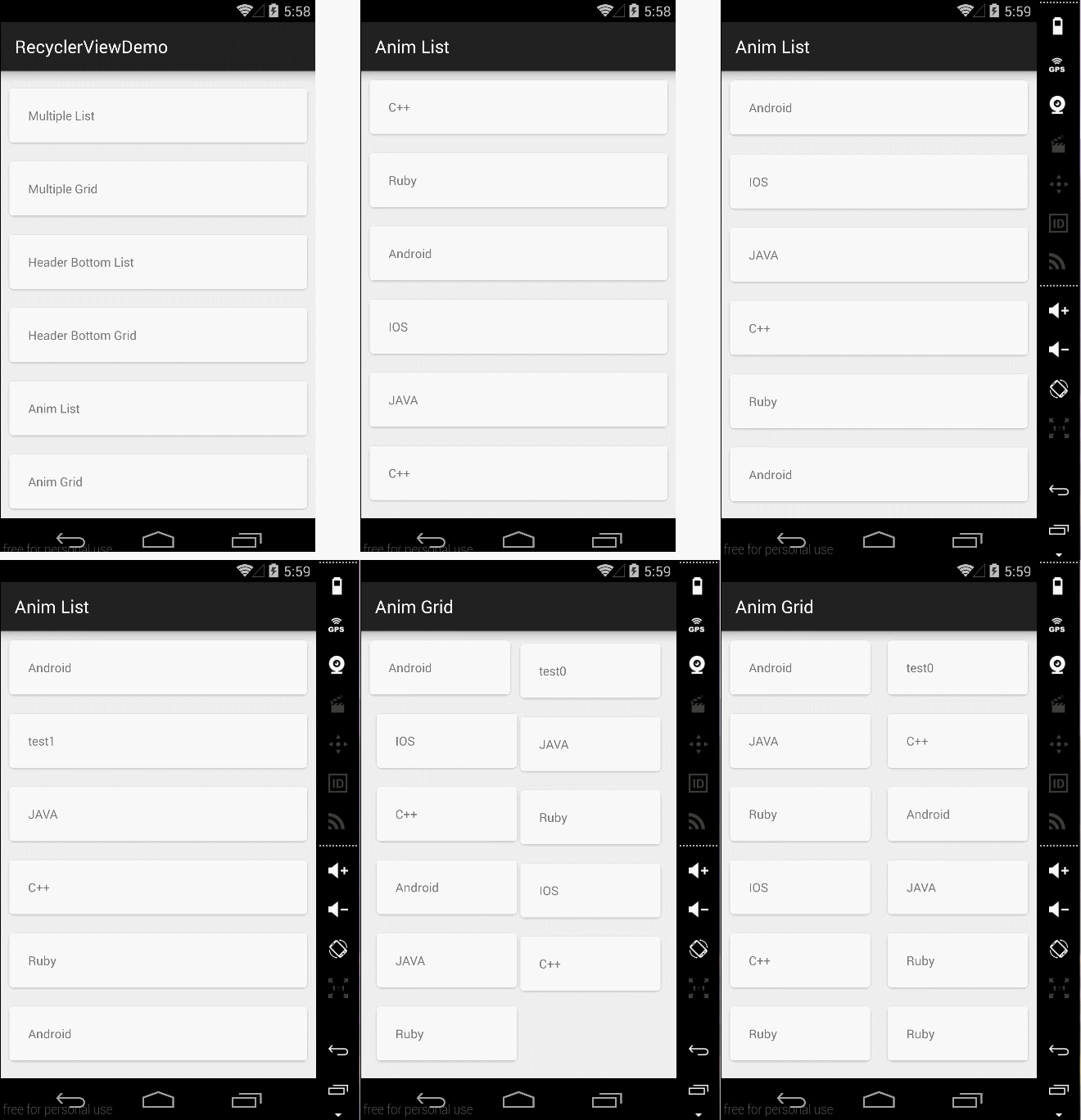
##二、Item的動畫實現 RecyclerView本身就已經實現了ITEM的動畫,只需要調用以下幾個函數來增刪Item即可出現默認動畫。
[代碼]java代碼:
|
1
2
3
4
5
6
|
notifyItemChanged(
int
)
notifyItemInserted(
int
)
notifyItemRemoved(
int
)
notifyItemRangeChanged(
int
,
int
)
notifyItemRangeInserted(
int
,
int
)
notifyItemRangeRemoved(
int
,
int
)
|
怎么樣,是不是很輕松,如果你不滿足系統默認動畫,那么你可以自定義實現RecyclerView.ItemAnimator的接口方法,實現代碼可以參考DefaultItemAnimator.當然,如果你不想自己實現,那么也沒關系,這里有人已經寫了開源庫,你可以去看看recyclerview-animators,這里給出默認動畫實現方式代碼AnimFragment
##三、嵌套RecycleView
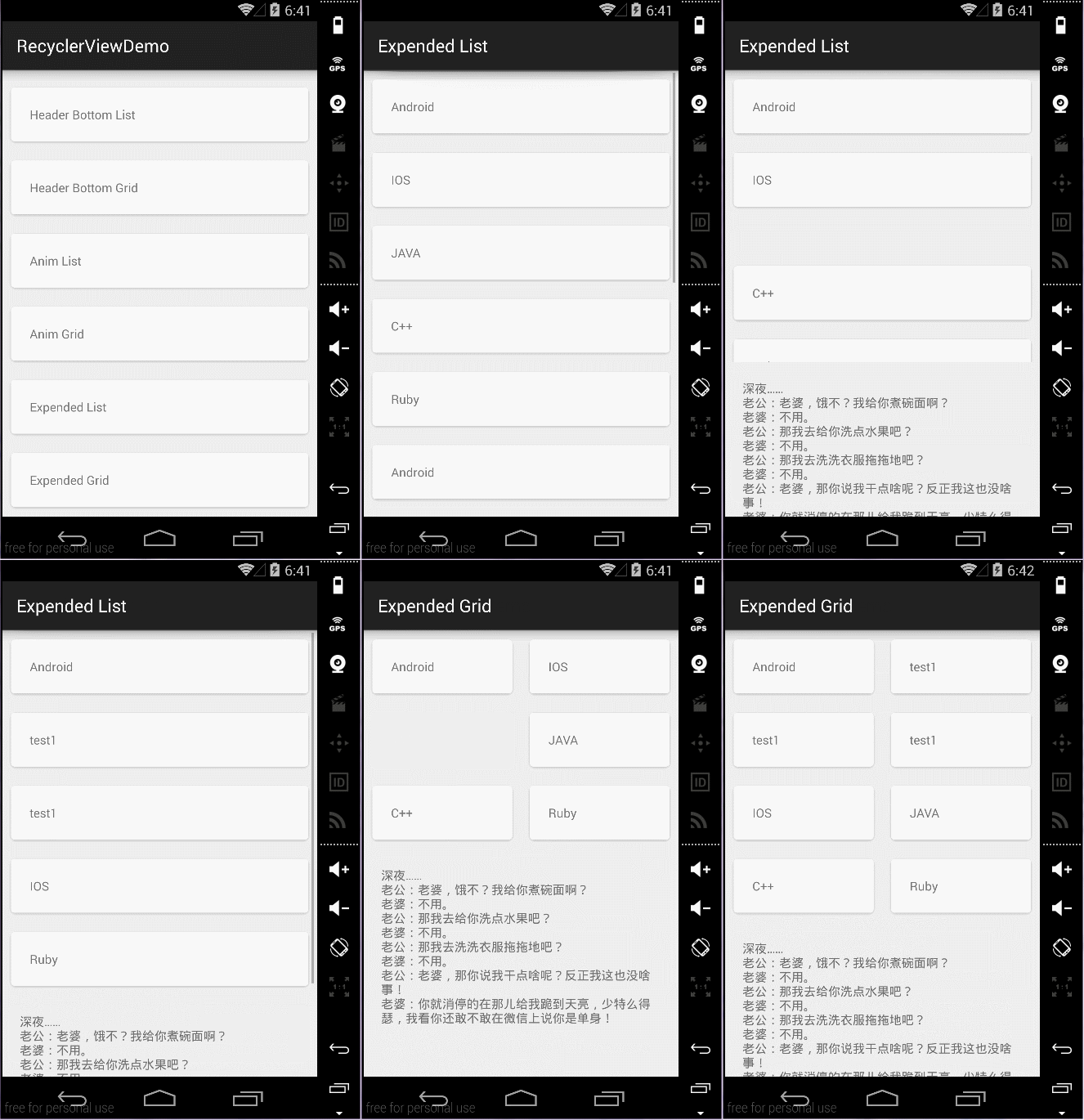
一般是不推薦使用嵌套RecycleView的,和ListView是類似的,遇到這種需要嵌套的View一般都是想別的辦法來規避,比如動態AddView,或者通過RecycleView的MultipleItemAdapter來實現,通過設置不同的ItemType布局不同的View,但是有時候會閑麻煩,想直接就用嵌套的方式來做,那么和ListView實現方式不同的是,ListView的實現一般都是繼承ListView然后復寫onMeasure方法,如下所示:
[代碼]java代碼:
|
1
2
3
4
5
|
@Override
protected
void
onMeasure(
int
widthMeasureSpec,
int
heightMeasureSpec) {
int
expandSpec = MeasureSpec.makeMeasureSpec(Integer.MAX_VALUE >>
2
, MeasureSpec.AT_MOST);
super
.onMeasure(widthMeasureSpec, expandSpec);
}
|
但是RecycleView的實現方式不再是繼承RecycleView來做,而是通過修改LayoutManager的方式,即通過繼承LinearLayoutManager GridLayoutManager StaggeredGridLayoutManager來修改子控件的測量,下面給出主要代碼:
[代碼]java代碼:
|
01
02
03
04
05
06
07
08
09
10
11
12
13
14
15
16
17
18
19
20
21
22
23
24
25
26
27
28
29
30
31
32
33
34
35
36
37
38
39
40
41
42
43
44
45
46
47
48
49
50
51
52
53
54
55
56
57
58
59
60
61
62
63
64
65
66
67
68
69
70
71
72
73
74
75
76
77
78
|
private
int
[] mMeasuredDimension =
new
int
[
2
];
@Override
public
void
onMeasure(RecyclerView.Recycler recycler, RecyclerView.State state,
int
widthSpec,
int
heightSpec) {
final
int
widthMode = View.MeasureSpec.getMode(widthSpec);
final
int
heightMode = View.MeasureSpec.getMode(heightSpec);
final
int
widthSize = View.MeasureSpec.getSize(widthSpec);
final
int
heightSize = View.MeasureSpec.getSize(heightSpec);
Log.i(TAG,
"onMeasure called. \nwidthMode "
+ widthMode
+
" \nheightMode "
+ heightSpec
+
" \nwidthSize "
+ widthSize
+
" \nheightSize "
+ heightSize
+
" \ngetItemCount() "
+ getItemCount());
int
width =
0
;
int
height =
0
;
for
(
int
i =
0
; i < getItemCount(); i++) {
measureScrapChild(recycler, i,
View.MeasureSpec.makeMeasureSpec(i, View.MeasureSpec.UNSPECIFIED),
View.MeasureSpec.makeMeasureSpec(i, View.MeasureSpec.UNSPECIFIED),
mMeasuredDimension);
if
(getOrientation() == HORIZONTAL) {
width = width + mMeasuredDimension[
0
];
if
(i ==
0
) {
height = mMeasuredDimension[
1
];
}
}
else
{
height = height + mMeasuredDimension[
1
];
if
(i ==
0
) {
width = mMeasuredDimension[
0
];
}
}
}
switch
(widthMode) {
case
View.MeasureSpec.EXACTLY:
width = widthSize;
case
View.MeasureSpec.AT_MOST:
case
View.MeasureSpec.UNSPECIFIED:
}
switch
(heightMode) {
case
View.MeasureSpec.EXACTLY:
height = heightSize;
case
View.MeasureSpec.AT_MOST:
case
View.MeasureSpec.UNSPECIFIED:
}
setMeasuredDimension(width, height);
}
private
void
measureScrapChild(RecyclerView.Recycler recycler,
int
position,
int
widthSpec,
int
heightSpec,
int
[] measuredDimension) {
try
{
View view = recycler.getViewForPosition(
0
);
//fix 動態添加時報IndexOutOfBoundsException
if
(view !=
null
) {
RecyclerView.LayoutParams p = (RecyclerView.LayoutParams) view.getLayoutParams();
int
childWidthSpec = ViewGroup.getChildMeasureSpec(widthSpec,
getPaddingLeft() + getPaddingRight(), p.width);
int
childHeightSpec = ViewGroup.getChildMeasureSpec(heightSpec,
getPaddingTop() + getPaddingBottom(), p.height);
view.measure(childWidthSpec, childHeightSpec);
measuredDimension[
0
] = view.getMeasuredWidth() + p.leftMargin + p.rightMargin;
measuredDimension[
1
] = view.getMeasuredHeight() + p.bottomMargin + p.topMargin;
recycler.recycleView(view);
}
}
catch
(Exception e) {
e.printStackTrace();
}
finally
{
}
}
|
[代碼]java代碼:
|
01
02
03
04
05
06
07
08
09
10
11
12
13
14
15
16
17
18
19
20
21
22
23
24
25
26
27
28
29
30
31
32
33
34
35
36
37
38
39
40
41
42
43
44
45
46
47
48
49
50
51
52
53
54
55
56
57
58
59
60
61
62
63
64
65
66
67
68
69
70
71
72
73
74
|
private
int
[] mMeasuredDimension =
new
int
[
2
];
@Override
public
void
onMeasure(RecyclerView.Recycler recycler, RecyclerView.State state,
int
widthSpec,
int
heightSpec) {
final
int
widthMode = View.MeasureSpec.getMode(widthSpec);
final
int
heightMode = View.MeasureSpec.getMode(heightSpec);
final
int
widthSize = View.MeasureSpec.getSize(widthSpec);
final
int
heightSize = View.MeasureSpec.getSize(heightSpec);
int
width =
0
;
int
height =
0
;
int
count = getItemCount();
int
span = getSpanCount();
for
(
int
i =
0
; i < count; i++) {
measureScrapChild(recycler, i,
View.MeasureSpec.makeMeasureSpec(i, View.MeasureSpec.UNSPECIFIED),
View.MeasureSpec.makeMeasureSpec(i, View.MeasureSpec.UNSPECIFIED),
mMeasuredDimension);
if
(getOrientation() == HORIZONTAL) {
if
(i % span ==
0
) {
width = width + mMeasuredDimension[
0
];
}
if
(i ==
0
) {
height = mMeasuredDimension[
1
];
}
}
else
{
if
(i % span ==
0
) {
height = height + mMeasuredDimension[
1
];
}
if
(i ==
0
) {
width = mMeasuredDimension[
0
];
}
}
}
switch
(widthMode) {
case
View.MeasureSpec.EXACTLY:
width = widthSize;
case
View.MeasureSpec.AT_MOST:
case
View.MeasureSpec.UNSPECIFIED:
}
switch
(heightMode) {
case
View.MeasureSpec.EXACTLY:
height = heightSize;
case
View.MeasureSpec.AT_MOST:
case
View.MeasureSpec.UNSPECIFIED:
}
setMeasuredDimension(width, height);
}
private
void
measureScrapChild(RecyclerView.Recycler recycler,
int
position,
int
widthSpec,
int
heightSpec,
int
[] measuredDimension) {
if
(position < getItemCount()) {
try
{
View view = recycler.getViewForPosition(
0
);
//fix 動態添加時報IndexOutOfBoundsException
if
(view !=
null
) {
RecyclerView.LayoutParams p = (RecyclerView.LayoutParams) view.getLayoutParams();
int
childWidthSpec = ViewGroup.getChildMeasureSpec(widthSpec,
getPaddingLeft() + getPaddingRight(), p.width);
int
childHeightSpec = ViewGroup.getChildMeasureSpec(heightSpec,
getPaddingTop() + getPaddingBottom(), p.height);
view.measure(childWidthSpec, childHeightSpec);
measuredDimension[
0
] = view.getMeasuredWidth() + p.leftMargin + p.rightMargin;
measuredDimension[
1
] = view.getMeasuredHeight() + p.bottomMargin + p.topMargin;
recycler.recycleView(view);
}
}
catch
(Exception e) {
e.printStackTrace();
}
}
}
|
##四、效果圖如下:
Item默認動畫效果
嵌套ScrollView效果
最后給出代碼下載地址–>Demo Code