項目簡介
DateTools 用於提高Objective-C中日期和時間相關操作的效率.靈感來源於 DateTime和[Time Period Library](Time Period Library).
安裝
使用 Cocoapods 安裝
pod 'DateTools'
NSDate+DateTools
DateTools讓NSDate功能更完整,可以讓你更容易地去獲取日期各個組件的信息,如年 月 日等.
獲取字符串形式的時間間隔.
DateTools 可以讓你獲取距離一個過去的時間點距離當前時間的字符串表示.和Twitter中很像,這個時間字符串有完整形式和縮略形式兩種.你可以像下面這樣使用:
NSDate *timeAgoDate = [NSDate dateWithTimeIntervalSinceNow:-4];
NSLog(@"Time Ago: %@", timeAgoDate.timeAgoSinceNow);
NSLog(@"Time Ago: %@", timeAgoDate.shortTimeAgoSinceNow);

//輸出:
//Time Ago: 4 seconds ago
//Time Ago: 4s

// 如果工程支持國際化,並且模擬器或真機環境設為簡體中文,則會輸出:
// Time Ago: 4秒鍾前
// Time Ago: 4秒
如果你的工程支持國際化,DateTools現在會自動支持以下語言的本地化:
- ar (Arabic)
- bg (Bulgarian)
- ca (Catalan)
- zh_Hans (簡體中文)
- zh_Hant (繁體中文)
- cs (Czech)
- da (Danish)
- nl (Dutch)
- en (English)
- fi (Finnish)
- fr (French)
- de (German)
- gre (Greek)
- gu (Gujarati)
- he (Hebrew)
- hi (Hindi)
- hu (Hungarian)
- is (Icelandic)
- id (Indonesian)
- it (Italian)
- ja (Japanese)
- ko (Korean)
- lv (Latvian)
- ms (Malay)
- nb (Norwegian)
- pl (Polish)
- pt (Portuguese)
- ro (Romanian)
- ru (Russian)
- sl (Slovenian)
- es (Spanish)
- sv (Swedish)
- th (Thai)
- tr (Turkish)
- uk (Ukrainian)
- vi (Vietnamese)
- cy (Welsh)
- hr (Croatian)
獲取日期的某個組成部分,如年月周日時分秒等.
使用 DateTools 可以很容易地獲取日期對象的某一組成部分:
NSDate * date = [NSDate date];
NSInteger year = date.year;
NSInteger month = date.month;
NSLog(@"year: %ld, month: %ld", (long)year, (long)month); // year: 2015, month: 9
如果你不想使用公歷,可以這樣做:
NSInteger day = [date dayWithCalendar:calendar];
如果你想改變 DateTools 使用的默認日歷,可以改寫 NSDate+DateTools.m 中的 defaultCalendar 方法.
日期編輯
可以使用 dateByAdding... 或 dateBySubtractingYears... 進行日期按年/月/日/時分/秒等增加或減少:
NSDate * date = [NSDate date];
NSInteger oldYear = date.year;

NSDate *newDate = [date dateByAddingYears:1];
NSInteger newYear = newDate.year;

NSLog(@"oldYear: %ld newYear: %ld", (long)oldYear, (long)newYear); // 輸出: oldYear: 2015 newYear: 2016
日期比較
DateTools 提供下列方法,比較兩個日期的大小,返回結果為一個布爾值:
- isEarlierThan
- isEarlierThanOrEqualTo
- isLaterThan
- isLaterThanOrEqualTo
如果想獲取兩個日期具體的差值: 獲取毫秒間隔可以使用 NSDate 提供的 timeIntervalSinceDate:和 timeIntervalSinceNow 方法;獲取相差多少年/月/周/日/時/分/秒等,可以直接使用 DateTools的擴展方法.
NSInteger yearsApart = [firstDate yearsFrom:secondDate];
類似yearsFrom:用於日期比較的方法包括:
yearsFrom:,yearsUntil,yearsAgo,yearsEarlierThan:,yearsLaterThan:monthsFrom:,monthsUntil,monthsAgo,monthsEarlierThan:,monthsLaterThan:weeksFrom:,weeksUntil,weeksAgo,weeksEarlierThan:,weeksLaterThan:daysFrom:,daysUntil,daysAgo,daysEarlierThan:,daysLaterThan:hoursFrom:,hoursUntil,hoursAgo,hoursEarlierThan:,hoursLaterThan:minutesFrom:,minutesUntil,minutesAgo,minutesEarlierThan:,minutesLaterThan:secondsFrom:,secondsUntil,secondsAgo,secondsEarlierThan:,secondsLaterThan:
日期的格式化輸出
可以使用 code>formattedDateWithStyle: 和 formattedDateWithFormat: 方法格式化輸出日期:
NSDate * date = [NSDate date];
NSString * dateStr = [date formattedDateWithStyle: NSDateFormatterFullStyle];

// 此處輸出的具體內容會根據你的手機或模擬器語言環境的不同而不同.
NSLog(@"%@", dateStr); // 輸出: 2015年9月25日 星期五

dateStr =  [date formattedDateWithFormat:@"YYYY/MM/dd HH:mm:ss"];
NSLog(@"%@", dateStr); // 輸出: 2015/09/25 15:19:23
時間段
DateTools 通過 DTTimePeriod類來簡化時間段相關的操作.
初始化
已知開始和結束時間,可以使用下面的方法初始化時間段對象:
DTTimePeriod *timePeriod = [[DTTimePeriod alloc] initWithStartDate:startDate endDate:endDate];
或者,已知起始或結束時間,同時知道時間段的總時長,可以用類似下面的方法創建時間端對象:
// 創建一個時間段,從現在開始,共5個小時.
DTTimePeriod *timePeriod = [DTTimePeriod timePeriodWithSize:DTTimePeriodSizeHour amount:5 startingAt:[NSDate date]];
時間段信息
可以通過 DTTimePeriod 的實例方法來獲取時間段的相關信息:
hasStartDate- 返回YES,如果有起始時間.hasEndDate- 返回YES,如果有結束時間.isMoment- 返回YES,如果起始時間和結束時間相同.durationIn....- 返回指定單位下時間段的長度.
DTTimePeriod *timePeriod = [[DTTimePeriod alloc] initWithStartDate:date endDate: [date dateByAddingDays: 10]];

NSLog(@"相差 %g 天", [timePeriod durationInDays]); // 輸出: 相差 10 天
操作
可以對時間段進行移動,延長或縮短的操作.
移動
當一個時間段被移動時,起始時間和結束時間會相應地同步遷移或推后.可以使用下面兩個方法移動時間段:
shiftEarlierWithSize:amount:時間段整體前移shiftLaterWithSize:amount:時間段整體推后
延長/縮短
可以通過保持起始點/中間時間點/結束時間點不變,然后改變開始或結束時間點,以得到延長或縮短時間段的目的:
// 通過前移起始時間,把時間段總時長從1分鍾變為2分鍾.
DTTimePeriod *timePeriod  = [DTTimePeriod timePeriodWithSize:DTTimePeriodSizeMinute endingAt:[NSDate date]];
[timePeriod lengthenWithAnchorDate:DTTimePeriodAnchorEnd size:DTTimePeriodSizeMinute amount:1];
關系
可以使用 DTTimePeriod 的關系操作相關的方法,來判斷兩個時間段的相互關系,如是否包含,是否是同一段時間等.
基礎
下圖表格列出了兩個時間段所有可能的關系:
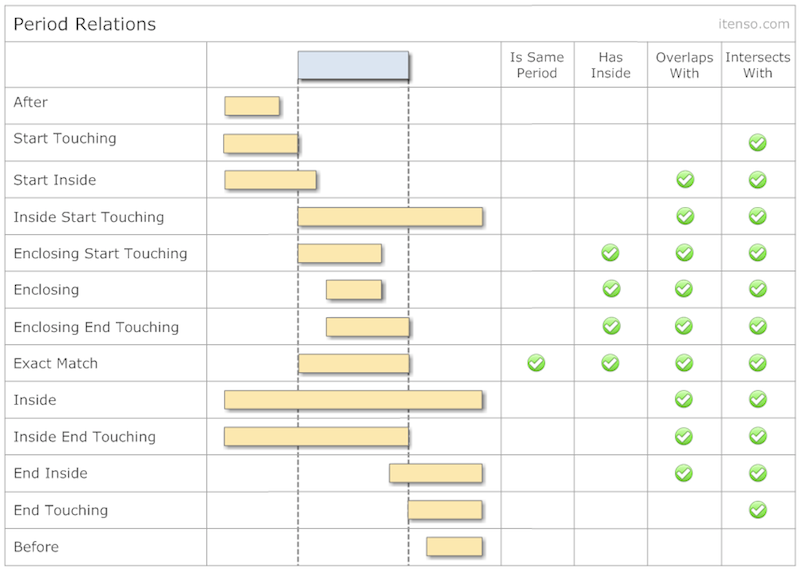
可通過下列方法判斷兩個時間段的關系:
- isEqualToPeriod:
- isInside:
- contains:
- overlapsWith:
- intersects:
你可以通過下面這個方法獲取相對於另一個時間段的關系:
-(DTTimePeriodRelation)relationToPeriod:(DTTimePeriod *)period;
所有可能的時間段間的關系都列在了枚舉 DTTimePeriodRelation 中了.
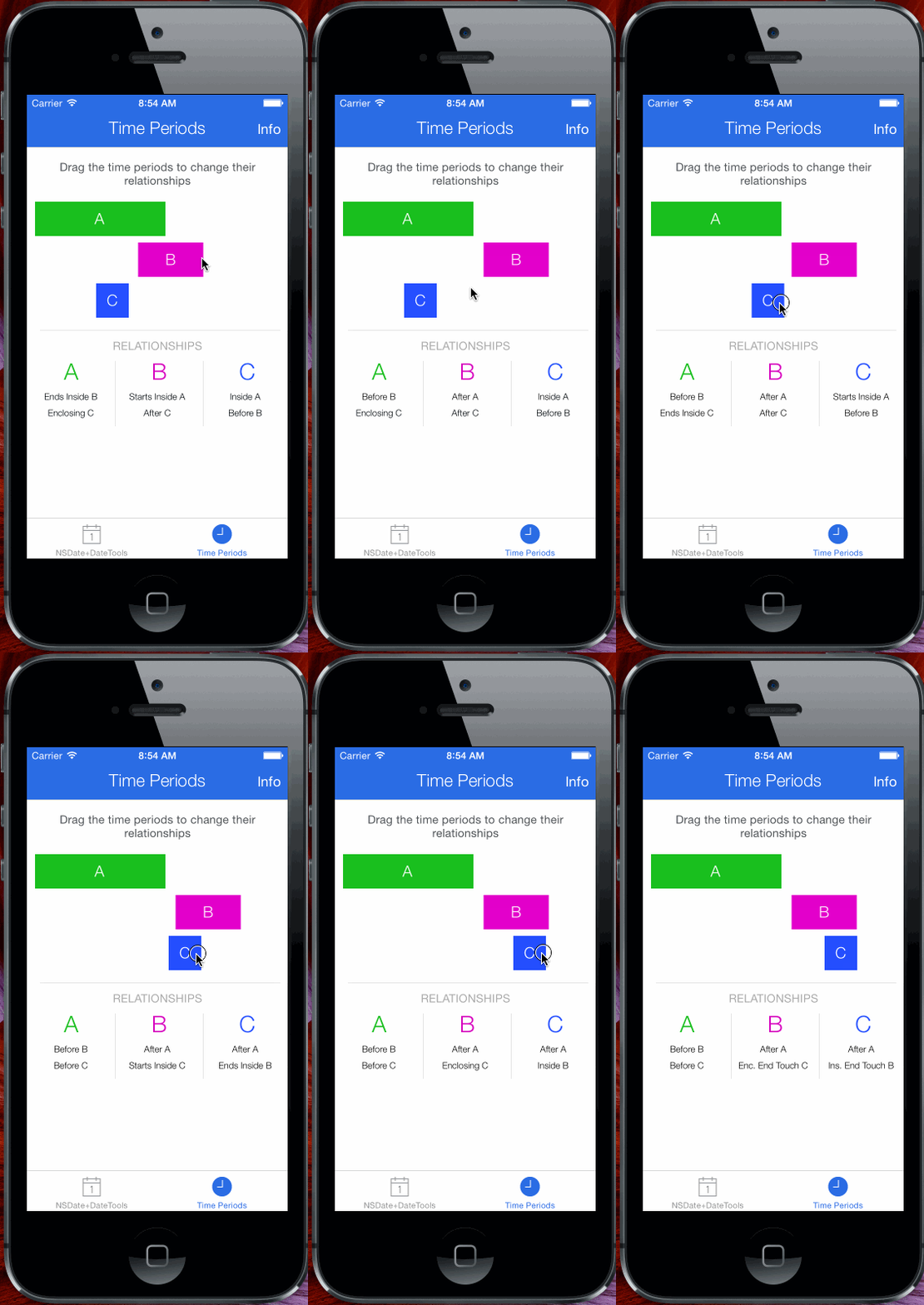
點擊示例中 Time Periods 按鈕,然后滑動滑塊,可以更好地掌握時間段之間的相互關系
時間段集合
DateTools 提供兩種時間段集合類: DTTimePeriodCollection 和 DTTimePeriodChain.前者,允許存儲彼此有交集的時間段;后者,不允許存儲彼此有交集的時間段.
這兩個時間段集合類,操作和 NSArray 很像.你可以添加,插入和移除 DTTimePeriod 對象,就像你在數組時的那樣.唯一的不同是,兩中集合存儲時間段的方式.
DTTimePeriodCollection 和 DTTimePeriodChain,是為了簡化基於多個時間段的邏輯處理.比如同一團隊中,給不同的人設置任務的起始和結束時間,此時如果使用 DTTimePeriodCollection 來處理各個時間段,可以直接得到團隊總任務的起始時間和結束時間.
DTTimePeriodCollection
DTTimePeriodCollection 是一個規則相對寬松的集合.默認無序(指的是順序和各個時間段的起止時間無關.),但支持手動排序;擁有自己的屬性,比如基於內粗存儲的時間段計算出的此集合的開始時間和結束時間.這個結合允許存儲有交集的時間段.
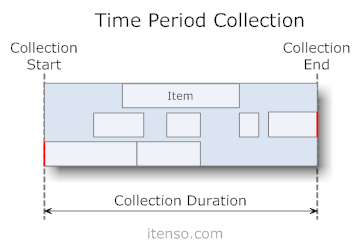
可以像下面這樣創建新的DTTimePeriodCollection集合:
// 創建集合.
DTTimePeriodCollection *collection = [DTTimePeriodCollection collection];

// 創建時間段
NSDateFormatter * dateFormatter = [[NSDateFormatter alloc]init];
[dateFormatter setDateFormat: @"YYYY MM dd HH:mm:ss.SSS"];
DTTimePeriod *firstPeriod = [DTTimePeriod timePeriodWithStartDate:[dateFormatter dateFromString:@"2014 11 05 18:15:12.000"] endDate:[dateFormatter dateFromString:@"2015 11 05 18:15:12.000"]];
DTTimePeriod *secondPeriod = [DTTimePeriod timePeriodWithStartDate:[dateFormatter dateFromString:@"2015 11 05 18:15:12.000"] endDate:[dateFormatter dateFromString:@"2016 11 05 18:15:12.000"]];

// 把時間段添加到集合中.
[collection addTimePeriod:firstPeriod];
[collection addTimePeriod:secondPeriod];

// 從集合中獲取時間段.
firstPeriod = collection[0];
排序
有三類給集合內時間段排序的方法:
- 根據起始時間排序 -
sortByStartAscending,sortByStartDescending - 根據結束時間排序 -
sortByEndAscending,sortByEndDescending - 根據時長排序 -
sortByDurationAscending,sortByDurationDescending
操作
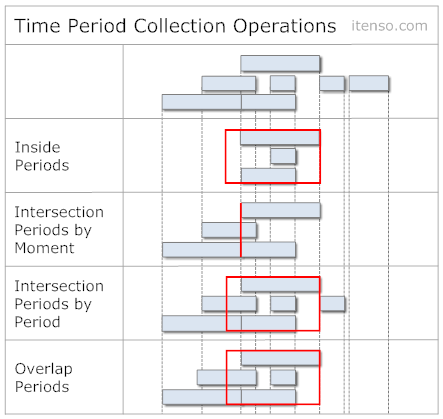
也可以去獲取一個 NSDate 對象或一個 DTTimePeriod 對象與一個 時間段結合的相對關系.例如,你可以通過
有許多類似的方法,如下圖:
DTTimePeriodChain
DTTimePeriodChain 以較為嚴格的方式存儲時間段對象. DTTimePeriodChain集合通常依據開始和結束時間存儲時間段對象,並且有自己的屬性,如 根據內部存儲的時間段對象推斷出來的此集合的開始時間和結束時間. DTTimePeriodChain 內部存儲的時間段對象不允許有交集.這種集合很適用於連續會議或約會等日程類事務的建模.
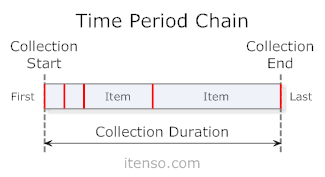
創建一個新的 DTTimePeriodChain 集合:
// 創建集合.
DTTimePeriodChain *chain = [DTTimePeriodChain chain];

// 創建時間段
NSDateFormatter * dateFormatter = [[NSDateFormatter alloc]init];
[dateFormatter setDateFormat: @"YYYY MM dd HH:mm:ss.SSS"];

DTTimePeriod *firstPeriod = [DTTimePeriod timePeriodWithStartDate:[dateFormatter dateFromString:@"2014 11 05 18:15:12.000"] endDate:[dateFormatter dateFromString:@"2015 11 05 18:15:12.000"]];
DTTimePeriod *secondPeriod = [DTTimePeriod timePeriodWithStartDate:[dateFormatter dateFromString:@"2015 11 05 18:15:12.000"] endDate:[dateFormatter dateFromString:@"2016 11 05 18:15:12.000"]];

// 添加時間段對象到集合中.
[chain addTimePeriod:firstPeriod];

// 如果后存入的時間和前一個存入的時間無法前后完全銜接,則后一個時間會適當前移或后移,以使前后時間段緊湊.
[chain addTimePeriod:secondPeriod];

// 獲取集合中的元素.
firstPeriod = chain[0];
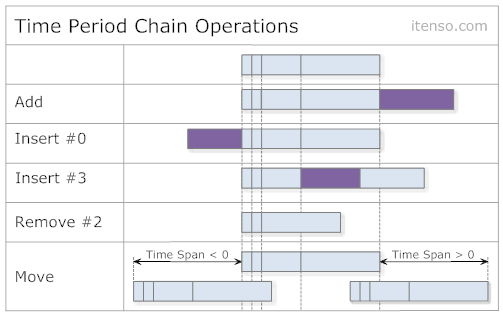
新加入的時間段,時長不變,起始時間變為前一個時間段的結束時間,結束時間對應前移后后移.在非零位置新插入的時間,其后的時間段相應后移.在零位置插入的時間,集合的起始時間前移.操作圖解如下:
操作
像 DTTimePeriodCollection 一樣, DTTimePeriodChain 也可以進行相等性比較,並且也可以前移后后移.其他執行的方法在下圖列出: